A Practical Guide to Vulnerability Assessment Tools


You've deployed firewalls, endpoint protection, and other security controls. Your vulnerability assessment tools are running on schedule, and your team is patching diligently. But a nagging question remains: are you actually secure? A clean scan report doesn't guarantee your defenses will hold up against a real-world attack. Identifying vulnerabilities is only the first step. To gain true confidence in your security posture, you need to validate that your controls work as expected and prioritize the flaws that attackers are actively exploiting. This is where threat intelligence and breach and attack simulation become essential, helping you prove your resilience against modern threats.
Key Takeaways
- Go beyond reactive security: A vulnerability assessment tool is the foundation of a proactive strategy. Use it to continuously scan your complete attack surface and fix weaknesses before they become active threats.
- Prioritize smarter, not harder: Relying on CVSS scores alone is inefficient. Integrate real-world threat intelligence to see which vulnerabilities are actively exploited, so you can focus your team’s limited resources on the most immediate dangers.
- Validate your defenses with active testing: Finding vulnerabilities is only half the battle; you also need to prove your security controls work. Incorporate Breach and Attack Simulation (BAS) to safely test your defenses and confirm that your remediation efforts were successful.
What Is a Vulnerability Assessment Tool?
A vulnerability assessment tool is software designed to systematically scan your digital environment for security weaknesses. Think of it as a security check-up for your entire IT infrastructure, covering everything from servers and networks to applications and endpoints. The main goal is to identify, classify, and prioritize these vulnerabilities before an attacker has a chance to find and exploit them. This process is the foundation of any solid vulnerability management program, giving you a clear, organized inventory of potential risks. It’s the essential first step toward securing your organization’s critical assets and data.
How Do These Tools Work?
At their core, these tools work by running automated scans across your systems. They check for security gaps by comparing what they find against a massive database of known issues, like the Common Vulnerabilities and Exposures (CVEs) list. This continuous cycle helps your team stay on top of new risks as they emerge. However, many organizations find that older scanning methods fall short, often struggling with incomplete asset visibility and overwhelming data volumes. Modern platforms move beyond simple scanning to provide a complete view of your total attack surface. This ensures you aren't missing critical assets and can manage the constant flow of vulnerability data without getting buried in noise.
Their Role in Proactive Cybersecurity
Vulnerability assessment tools are fundamental to shifting your security strategy from reactive to proactive. Instead of waiting for an incident to happen and then scrambling to fix it, you're actively hunting for weaknesses and addressing them first. A strong tool provides the data you need to build a comprehensive, risk-based management program. This isn't a one-time activity; it's a continuous process of discovery, prioritization, and remediation. The insights from these tools help you focus your efforts where they matter most, ensuring you address the most critical threats first. This approach helps you build a stronger security posture and confidently manage your organization's exposure with a clear plan for vulnerability and threat prioritization. Assessment programs become more actionable when teams connect findings to breach and attack simulation benefits such as validated prioritization.
Why Do You Need a Vulnerability Assessment Tool?
In a perfect world, our systems would be flawless. But back in reality, vulnerabilities are a constant. A vulnerability assessment tool is your best bet for getting ahead of them. It’s not just about patching holes; it’s about building a more resilient security posture from the ground up. These tools help you shift from constantly reacting to threats to proactively managing your exposure. Let's look at how they can make a real difference for your team.
Stop Breaches Before They Start
The best way to handle a security breach is to prevent it from ever happening. Vulnerability assessment tools are designed to do just that. They systematically check your systems, applications, and networks for security weaknesses, helping you find flaws before attackers can exploit them. This proactive approach allows you to spot potential entry points and fix them, effectively closing the door on threats. Instead of waiting for an incident to happen, you can build a stronger defense by addressing issues early. This shift helps your team move from a reactive, high-stress environment to one where you are in control of your cybersecurity posture.
Stay on Top of Compliance
Meeting compliance standards can feel like a moving target, but vulnerability assessment tools bring much-needed clarity. Many regulations and industry standards, like PCI DSS or HIPAA, require regular security checks and documented proof that you're performing them. These tools automate much of that process, generating the reports you need to satisfy auditors. More importantly, they help you achieve the complete asset visibility that compliance demands. You can’t secure what you don’t know you have. By ensuring all your devices, applications, and cloud assets are accounted for, you eliminate dangerous blind spots and can manage vulnerabilities across your entire attack surface.
Speed Up Your Remediation Time
Your security team is busy, and their time is valuable. A good assessment tool helps them work smarter, not harder. Instead of juggling spreadsheets and data from different systems, these tools provide a single platform to monitor, manage, and address vulnerabilities. This centralized view cuts down on the complexity of coordinating security efforts. The real game-changer, however, is prioritization. You're going to find a lot of problems, but not all of them carry the same risk. A modern tool helps you focus on what truly threatens your business, so your team can direct its energy toward fixing the most critical issues first and significantly reduce your threat exposure.
What Features Matter Most in an Assessment Tool?
When you're evaluating vulnerability assessment tools, the sheer number of options can feel overwhelming. It’s easy to get lost in feature lists and marketing promises. The key is to focus on the capabilities that will actually make a difference in your day-to-day security operations. A great tool doesn’t just find vulnerabilities; it helps you manage them effectively from discovery to remediation. It should fit into your existing workflow, provide clear insights, and help your team focus on the risks that truly matter. Let's break down the essential features you should look for.
Automated Scanning and Continuous Monitoring
In a dynamic IT environment, manual, ad-hoc scanning just doesn’t cut it. Your attack surface is constantly changing, and you need a tool that can keep up. Automated vulnerability scanning helps you manage the flood of new risks by continuously monitoring your systems. This approach ensures you have a consistent, always-on process for identifying weaknesses across your entire attack surface. Instead of relying on periodic snapshots, continuous monitoring gives you a real-time view of your security posture. This allows your team to spot and address vulnerabilities as soon as they appear, rather than waiting for the next scheduled scan.
Clear Reporting and Analytics
A vulnerability scanner can generate a massive amount of data. Without clear reporting, that data is just noise. The best tools translate raw scan results into actionable intelligence. Look for solutions that offer customizable dashboards, trend analysis, and clear, concise reports that you can share with both technical teams and executive leadership. Effective reporting helps you cut through the overwhelming data volumes and focus on what’s important. It also allows you to track your progress over time, demonstrate the effectiveness of your security program, and make a strong case for the resources you need to protect the organization.
Smart Risk Prioritization
Not all vulnerabilities carry the same level of risk. A critical vulnerability on a non-essential internal server is less urgent than a medium-risk one on your primary, customer-facing application. This is why relying solely on CVSS scores can be misleading. You need a tool that provides smart, risk-based prioritization. This approach considers factors beyond a generic score, including the business impact of the asset, whether the vulnerability is actively being exploited in the wild, and how easy it would be for an attacker to reach it. This context is crucial for helping your team focus its limited time and resources on fixing the most critical threats first.
Seamless Security Integrations
Your vulnerability assessment tool shouldn't operate in a silo. To be truly effective, it needs to integrate smoothly with the other solutions in your security stack. Look for a tool that connects with your existing systems, such as ticketing platforms like Jira, SIEMs, and SOAR tools. These integrations allow you to automate workflows, like creating remediation tickets or triggering alerts, directly from the assessment tool. By connecting your security ecosystem, you can manage and address vulnerabilities from a single platform, reducing complexity and ensuring that critical information gets to the right people quickly. This streamlines the entire remediation process from detection to resolution.
What Are the Different Types of Assessment Tools?
Vulnerability assessment isn’t a one-size-fits-all process. Your technology stack has many layers, from the network foundation to the applications your customers use every day. Each layer has unique weaknesses, which is why specialized tools exist to find them. Think of it like securing a building; you need to check the locks on the doors, the strength of the windows, and the reliability of the alarm system. Using the right tool for the right job is key to getting a clear picture of your security posture.
A comprehensive strategy often involves a mix of these tools. Some organizations use several standalone scanners to cover their bases, while others opt for a unified platform that brings all these capabilities together. Understanding what each type of tool does helps you build a more effective threat exposure management program. Let’s walk through the main categories of assessment tools you’ll encounter.
Network Vulnerability Scanners
These are the foundational tools of vulnerability assessment. Network scanners check your digital perimeter and internal network for obvious entry points an attacker could exploit. They search for things like open ports, outdated protocols, and misconfigured devices like routers, firewalls, and servers. Essentially, they’re looking for unlocked doors and windows on your network. By identifying these weaknesses, you can close them before someone unwelcome wanders in. These scanners are crucial for maintaining basic network hygiene and are often the first step in any assessment process.
Web Application Security Scanners
So much of business runs on web applications, making them a prime target for attackers. Web application security scanners are designed to find flaws specific to these apps. They simulate attacks to uncover common web application vulnerabilities like SQL injection or cross-site scripting (XSS). These tools go beyond the network layer to test the code and logic of your applications, finding security holes that could lead to data breaches or service disruptions. If you have a public-facing website or application, this type of scanner is non-negotiable.
Database Security Assessment Tools
Your databases hold some of your most sensitive information, from customer data to intellectual property. Database security assessment tools focus specifically on protecting this critical asset. They scan your databases for weaknesses like weak or default passwords, missing patches, or excessive user permissions that could give an attacker too much access. By regularly checking the configuration and security settings of your databases, you can ensure your company’s crown jewels are properly protected from both internal and external threats.
Cloud Infrastructure Scanners
As more organizations move to the cloud, securing these dynamic environments has become a top priority. Cloud infrastructure scanners are built to monitor services like AWS, Azure, and Google Cloud for security issues. The biggest culprit in cloud breaches is often a simple misconfiguration. These tools help you find those mistakes, like publicly exposed storage buckets or overly permissive access policies. They are essential for managing the shared responsibility model of the cloud and making sure your part of the bargain is secure.
Container and DevOps Security Tools
Modern development moves fast, and security needs to keep up. Container and DevOps security tools are designed to find vulnerabilities early in the software development lifecycle. They scan container technologies like Docker for weaknesses in container images and their runtime configurations. By integrating these scans directly into the CI/CD pipeline, you can catch and fix security flaws before an application is ever deployed. This "shift-left" approach makes security a natural part of development instead of an afterthought, saving time and reducing risk.
Comparing the Top Vulnerability Assessment Tools
Choosing the right vulnerability assessment tool can feel overwhelming with so many options on the market. They aren't all created equal, and the best fit depends on your team’s size, budget, and specific security goals. Generally, these tools fall into a few main categories: comprehensive platforms that offer an all-in-one solution, other large-scale enterprise tools, flexible open-source alternatives, and highly focused specialized scanners. Understanding the key differences will help you select a tool that not only finds vulnerabilities but also fits seamlessly into your security workflow, making your entire program more effective. Let's look at how these different types of tools stack up.
Hive Pro Uni5 Xposure Platform
A comprehensive platform provides a systematic review of your organization’s security weaknesses to identify, classify, prioritize, and guide remediation. The Hive Pro Uni5 Xposure Platform is designed to do exactly that, offering a unified solution for end-to-end threat exposure management. Instead of juggling multiple tools, you get a single view of all your cyber risks across your entire attack surface. This approach helps you move from a reactive stance to a proactive one by focusing on what matters most. With advanced features like vulnerability and threat prioritization, you can see which issues pose an immediate danger, allowing your team to act decisively and efficiently.
Enterprise-Grade Solutions
Large organizations often struggle with outdated scanning methods, incomplete asset visibility, and overwhelming data volumes. Enterprise-grade solutions are built to address these complex challenges at scale. These tools typically offer powerful scanning capabilities, detailed reporting dashboards, and extensive integrations with other security and IT systems. They are designed for environments with thousands of assets and multiple security teams. While incredibly robust, these solutions can come with a steep learning curve and a significant price tag. They are a solid choice for mature security programs that need comprehensive features and dedicated vendor support to manage a vast and complicated infrastructure.
Open-Source Alternatives
For teams with tight budgets or specific customization needs, open-source tools can be a fantastic starting point. Tools like OpenVAS provide powerful scanning engines that can help you manage the flood of vulnerabilities by continuously monitoring your systems for new risks. Because they are community-driven, they are highly flexible and can be adapted to fit unique environments. However, the trade-off is the lack of dedicated support. Your team will be responsible for setup, maintenance, and troubleshooting. While they are effective for identifying vulnerabilities, they may not offer the advanced risk-based prioritization or streamlined reporting found in commercial platforms.
Specialized Assessment Tools
Sometimes, you need a tool that does one thing exceptionally well. Specialized assessment tools focus on a specific area of your infrastructure, such as web applications, cloud configurations, or databases. These tools provide a depth of analysis that broader scanners might miss, offering detailed insights into niche technologies. They are excellent for teams that need to conduct deep-dive assessments in a particular domain. The main drawback is that they only show you one piece of the puzzle. Relying solely on specialized tools can create information silos, making it difficult to get a holistic view of your organization's overall risk posture without a platform to aggregate the data.
How Threat Intelligence Improves Vulnerability Assessment
A vulnerability assessment tool gives you a list of weaknesses, but how do you know where to start? With thousands of new vulnerabilities discovered every year, trying to fix everything is a recipe for burnout. This is where threat intelligence comes in. It adds a critical layer of real-world context to your scan results, transforming a long list of potential issues into a focused, actionable plan.
Instead of relying solely on static severity scores like CVSS, integrating threat intelligence helps you see which vulnerabilities are being actively exploited by attackers in the wild. It answers the most important questions: Is anyone actually using this exploit? Are they targeting companies like mine? What would an attack look like? This insight is the key to moving from a reactive, compliance-driven approach to a proactive one. By understanding the threat landscape, you can implement a vulnerability and threat prioritization strategy that directs your resources toward the risks that truly matter to your organization.
Integrate Real-World Exploit Data
The sheer volume of Common Vulnerabilities and Exposures (CVEs) published daily can be overwhelming. The reality is that only a small fraction of them will ever be exploited in a real attack. Threat intelligence helps you cut through the noise by providing data on which vulnerabilities have working exploit code and are being used in active campaigns. This information is gathered from a global network of security researchers, honeypots, and dark web monitoring.
By integrating this data, your assessment tool can automatically flag vulnerabilities that pose an immediate threat. This allows your team to filter out the low-risk, theoretical vulnerabilities and concentrate on the ones that attackers are using right now. This data-driven approach is powered by dedicated research teams, like HiveForce Labs, that constantly analyze emerging threats.
Get Context for Every Risk
A CVSS score can tell you how severe a vulnerability could be in a general sense, but it can’t tell you how likely it is to affect you specifically. Threat intelligence provides the missing context. It can tell you about the threat actors who are using a particular exploit, the industries they typically target, and the specific tactics, techniques, and procedures (TTPs) they employ.
This level of detail helps you evaluate risk based on your unique environment. For example, a vulnerability being exploited by a group known for targeting financial institutions becomes a top priority if you work for a bank. This context allows you to make much smarter decisions about where to allocate your time and resources, ensuring you’re protecting your most critical assets from the most relevant threats.
Focus on Active Threats First
Ultimately, the goal of integrating threat intelligence is to focus your remediation efforts where they will have the greatest impact. When you know which vulnerabilities are being actively exploited, you can address them first, significantly reducing your exposure to an imminent breach. This risk-based approach helps you break the cycle of chasing down every single vulnerability your scanner finds.
Instead of working through an endless backlog, your team can operate from a much shorter, prioritized list of critical fixes. This not only improves your security posture but also makes the remediation process more efficient and less stressful. You can stay informed on the latest risks by following expert analysis and threat advisories that break down the most pressing threats.
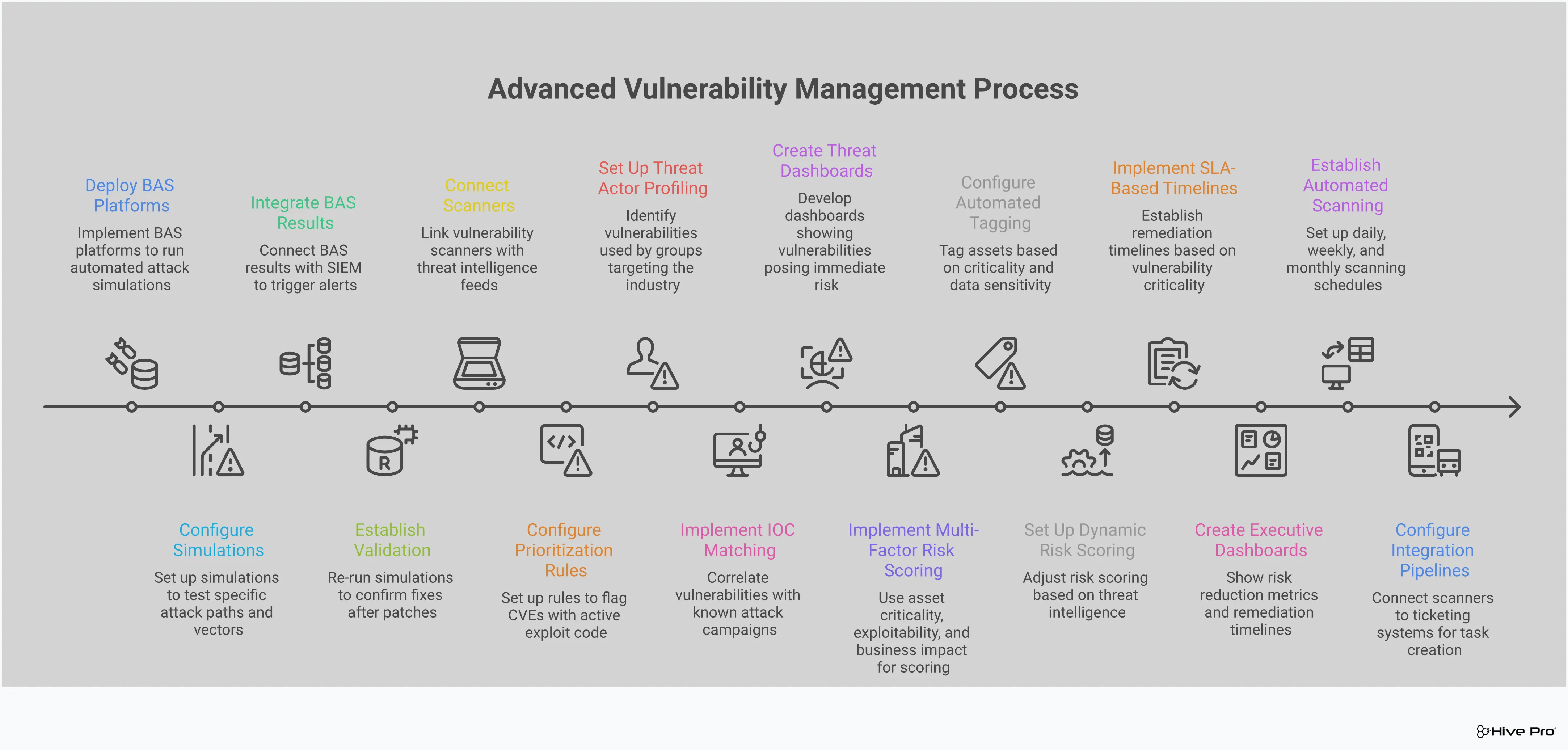
How Breach and Attack Simulation (BAS) Fits In
Vulnerability assessment tools are fantastic at showing you where the cracks are in your defenses. But how do you know if those cracks are actually exploitable? And are your security controls, like firewalls and endpoint detection, working as well as you think they are? This is where Breach and Attack Simulation (BAS) comes in. Think of it as a fire drill for your security stack. Instead of just identifying a potential weakness, BAS tools actively and safely simulate real-world attack paths to see how your defenses hold up.
By running these controlled attack scenarios, you move from a passive to an active security posture. You’re no longer just cataloging vulnerabilities; you’re pressure-testing your entire security program against the same tactics, techniques, and procedures (TTPs) that attackers use. This gives you a true, evidence-based picture of your security effectiveness. It helps you answer the tough questions, like "Could an attacker move from a compromised web server to our critical data?" or "Would we actually detect and block a ransomware attack in progress?" Integrating BAS into your vulnerability management program provides the proof you need to validate controls, confirm remediation, and build a more resilient defense.
Validate Your Security Controls
Your security infrastructure is made up of many layers, and you need to know that each one is pulling its weight. BAS platforms allow you to perform adversarial exposure validation by running automated simulations that mimic the behavior of real attackers. These simulations test if your security tools are configured correctly and are actually able to detect and block threats.
Instead of relying on assumptions, you get concrete evidence. For example, a simulation might test if your web application firewall (WAF) can block a common SQL injection attack or if your endpoint protection can stop a fileless malware script. This process helps you find and fix gaps in your defenses before a real attacker can exploit them, ensuring your security investments are delivering real value.
Test Your Remediation Efforts
After your team spends time patching a critical vulnerability, the next logical question is, "Did it work?" BAS provides a clear answer. Once a fix is in place, you can re-run the relevant attack simulation to confirm that the vulnerability is no longer exploitable. This step is crucial for closing the loop on your remediation workflow.
This process of post-remediation testing verifies that the patch was successful and didn't accidentally introduce new security issues. It gives your team confidence that their efforts have genuinely reduced risk. Think of it as quality assurance for your security fixes. It transforms remediation from a "patch and pray" exercise into a measurable, verifiable process that strengthens your overall security posture.
Achieve Continuous Security Validation
The threat landscape is constantly changing, with new attack techniques emerging all the time. A one-time penetration test can give you a snapshot of your security, but it quickly becomes outdated. BAS helps you shift to a model of continuous security validation, where your defenses are tested on an ongoing basis.
By implementing automated and regular attack simulations, you can ensure your security measures remain effective against the latest threats. This continuous feedback loop allows you to adapt and improve your defenses over time. It’s a core part of a modern threat exposure management program, helping you stay ahead of attackers by consistently validating that your people, processes, and technology are ready to defend against a real attack.
Common Implementation Challenges to Watch Out For
Rolling out a new vulnerability assessment tool is a big step, but it’s not without its hurdles. Even the best tools can create friction if you aren’t prepared for the common challenges that pop up during implementation. Knowing what to expect can help you smooth out the process, get your team on board, and start seeing value from your investment much faster. From managing a flood of new alerts to making sure the tool integrates with your existing stack, a little foresight goes a long way. Let’s walk through some of the most frequent obstacles and how you can get ahead of them.
Handling Alert Fatigue and False Positives
One of the first things you’ll notice with a new assessment tool is the sheer volume of data. It’s easy to become overwhelmed by an endless stream of alerts, which can quickly lead to alert fatigue. When your team is buried in notifications, the truly critical threats get lost in the noise. This problem is often made worse by false positives that send your team chasing down non-existent issues. The key is to move beyond just data collection and toward intelligent vulnerability and threat prioritization. A good tool won’t just show you every potential weakness; it will add context, helping you filter out the low-risk findings and focus on what actually puts your organization in danger.
Working with Limited Resources
Let’s be realistic: no security team has unlimited time, budget, or people. These constraints make it impossible to patch every single vulnerability your scanner finds. Trying to do so is a recipe for burnout and inefficiency. This is why a risk-based approach is non-negotiable. Instead of working from a massive, unmanageable list, you need to focus your limited resources on the vulnerabilities that pose the greatest threat to your most critical assets. This requires a clear understanding of your attack surface and the context behind each threat. By prioritizing strategically, you can make the biggest impact on your security posture without stretching your team too thin.
Dealing with Complex Integrations
Your vulnerability assessment tool doesn’t operate in a vacuum. It needs to connect with the other solutions in your security ecosystem, like your SIEM, ticketing systems, and patch management software. If these integrations are clunky or require extensive custom work, you’ll end up with data silos and inefficient workflows. This complexity can slow down your remediation efforts and make it difficult to get a unified view of your security posture. Look for a platform that offers seamless, out-of-the-box integrations. A truly effective threat exposure management platform centralizes your security data, making it easier to coordinate efforts across different tools and teams from a single interface.
Closing Asset Visibility Gaps
You can’t protect what you don’t know you have. One of the biggest challenges in vulnerability management is maintaining a complete and accurate inventory of all your assets. With the rise of cloud services, remote work, and IoT devices, it’s easier than ever for shadow IT and unmanaged assets to create dangerous blind spots. An incomplete asset inventory means your vulnerability scans are also incomplete, leaving parts of your network exposed. Achieving total attack surface management is fundamental. Your tool should continuously discover and map all your assets, from on-prem servers to cloud instances and web applications, ensuring you have full visibility across your entire environment.
How to Get the Most from Your Assessment Tool
A vulnerability assessment tool is a powerful ally, but it's not a magic wand. The real value comes from how you integrate it into your daily security practices. Simply running scans and generating reports won't move the needle on your security posture. To turn that data into meaningful risk reduction, you need a solid strategy. It’s about creating a repeatable process that covers everything from how often you scan to who is responsible for fixing what you find. Let's walk through four key practices that will help you transform your vulnerability assessment tool from a simple scanner into the core of a proactive security program.
Set a Regular Scanning Schedule
Your attack surface is constantly changing as new assets come online and software gets updated. That’s why a one-off scan is only a snapshot in time. To keep up, you need to establish a consistent scanning cadence. Implementing continuous scanning helps you identify new weaknesses as they appear, giving you a real-time view of your exposure. This approach enables your team to overcome remediation challenges and strengthen your security framework over time. Whether you choose daily, weekly, or monthly scans depends on your environment's risk profile, but the key is to make it a regular, automated part of your security operations. This consistency ensures you’re never caught off guard by a vulnerability that slipped through the cracks.
Define Clear Ownership and Accountability
A vulnerability report is only useful if someone acts on it. One of the biggest hurdles in vulnerability management is the lack of clear ownership. When a critical issue is found, who is responsible for the fix? Is it the security team, the IT team, or a specific developer? Without a clear answer, vulnerabilities can linger for weeks or months. To solve this, you need to assign ownership for every asset and every vulnerability identified. This creates a direct line of accountability and ensures that remediation tasks don't get lost in a shared inbox. It also fosters better collaboration between teams, turning vulnerability management into a shared responsibility rather than just a security problem.
Maintain Full Asset Visibility
You can't secure what you don't know you have. Shadow IT, forgotten servers, and new cloud instances can create significant blind spots in your security coverage. That's why achieving complete asset visibility is fundamental to any effective vulnerability management program. A thorough and continuously updated asset inventory ensures that all your devices, applications, and cloud resources are accounted for. This allows you to manage vulnerabilities across your entire attack surface, not just the parts you already know about. By eliminating these blind spots, you can be confident that your assessment tool is scanning everything it should be, giving you a true picture of your organization's risk.
Use a Risk-Based Prioritization Model
Not all vulnerabilities carry the same level of risk. A high-severity vulnerability on an internal test server is likely less urgent than a medium-severity one on your customer-facing payment portal. This is why relying solely on CVSS scores can be misleading. A modern, risk-based approach to vulnerability prioritization goes much deeper. It incorporates factors like real-world exploitability, threat intelligence, asset criticality, and business impact. This context helps you focus your team's limited time and resources on fixing the issues that pose a genuine threat to your organization. By prioritizing based on actual risk, you can address the most critical exposures first and make a measurable impact on your security posture.
Related Articles
- Breach and Attack Simulation (BAS): The Ultimate Guide
- How Threat Intelligence Improves Vulnerability Management
- The 7 Best Vulnerability Management Tools
- Security Controls Validation: A Complete Guide
- How BAS Improves Threat Exposure Management
Frequently Asked Questions
My scanner gives me CVSS scores. Isn't that enough for prioritization? While CVSS scores are a useful starting point, they don't tell the whole story. A CVSS score is a static, generic rating of a vulnerability's potential severity. It doesn't consider if attackers are actually exploiting it in the real world or if it's located on one of your most critical business assets. A modern, risk-based approach adds that crucial context. It integrates threat intelligence to see which vulnerabilities are being actively used in attacks, helping you focus on the clear and present dangers instead of just the theoretical ones.
How is Breach and Attack Simulation (BAS) different from a regular vulnerability scan? A vulnerability scan is like checking for unlocked doors and windows in your house; it identifies potential weaknesses. Breach and Attack Simulation, on the other hand, is like running a fire drill; it actively tests if someone could actually get through those doors and what they could do once inside. BAS safely simulates real attack methods to see if your security controls, like your firewall or endpoint protection, are configured correctly and would actually stop an attack. It validates that your defenses work as expected.
We're overwhelmed with alerts from our current scanner. How do we solve this? This is an incredibly common problem, and the solution isn't to find a quieter tool, but a smarter one. The key is to cut through the noise by focusing on actual risk. Instead of looking at a flat list of every potential issue, you need a system that uses threat intelligence to highlight the vulnerabilities that are actively being exploited. This allows you to build a much shorter, more manageable list of high-priority fixes that will have the biggest impact on your security.
Do I really need separate tools for my network, cloud, and applications? While specialized tools exist for each of these areas, juggling them can create information silos and make it hard to see your organization's total risk. Each tool gives you one piece of the puzzle. A more effective approach is to use a unified platform that brings all of these scanning capabilities together. This gives you a single, comprehensive view of your entire attack surface, so you can manage vulnerabilities consistently without having to switch between different systems and reports.
What's the most common mistake teams make when they first start using an assessment tool? The biggest mistake is failing to establish clear ownership for remediation. A tool can find thousands of issues, but if no one is clearly responsible for fixing them, the reports just become a list of problems. Before you even run your first scan, you should define who is accountable for which assets. When a vulnerability is found on a specific server or application, the report should go directly to the person or team who can actually fix it. This simple step prevents critical issues from getting lost and turns your assessment data into real action.





.svg)