Comprehensive Threat Exposure Management Platform
 Critical Threat Research : Middle-East at WAR: The Rapidly Escalating Iranian Cyber Threat Download the Report Critical Threat Research : Middle-East at WAR: The Rapidly Escalating Iranian Cyber Threat Download the Report
A home security system doesn’t just tell you that a window is unlocked; it tells you which window, whether someone is actively trying to open it, and in which room your most valuable possessions are stored. It gives you the context to act decisively. Similarly, a modern vulnerability management tool does more than just list your digital weak points. It provides the crucial context you need to understand your risk. By correlating vulnerabilities with real-time threat data and your critical assets, it shows you exactly where to focus your efforts to prevent a breach, turning an overwhelming list of alerts into a clear, actionable defense plan.
Think of a vulnerability management tool as your central hub for finding, evaluating, and fixing security weaknesses across your entire digital landscape. It’s a system designed to move you from a reactive “firefighting” mode to a proactive security posture. Instead of waiting for something to break, these tools continuously scan your systems, software, and networks to identify potential entry points for attackers before they can be exploited.
The core job of a vulnerability management tool is to automate the otherwise impossible task of manually checking every asset for flaws. It identifies everything from unpatched software and system misconfigurations to other security gaps that attackers love to find. But it doesn’t just hand you a massive list of problems. A modern tool provides a comprehensive view of your security landscape and helps you make sense of the data. It gives you the context needed for effective vulnerability and threat prioritization, so you know which issues to tackle first based on their potential impact.
It’s also important to understand that vulnerability management is not the same as patch management, even though they work together. Vulnerability management is the discovery and assessment phase—it tells you what’s broken and how critical it is. Patch management is the action of applying the fix. A good vulnerability management process feeds directly into your patch management strategy, ensuring you’re applying the right patches to the most critical systems at the right time. Ultimately, it’s about having a complete and continuous process to manage your total attack surface and reduce your overall exposure.
Choosing a vulnerability management tool can feel overwhelming, but it boils down to finding a platform that gives you clarity and helps your team take action. The goal isn’t just to find vulnerabilities; it’s to fix the ones that actually matter before they can be exploited. A great tool acts like a trusted advisor, cutting through the noise to show you exactly where to focus. As you evaluate your options, think about the entire lifecycle—from discovering your assets to confirming a fix is in place. Here are the core capabilities you should look for.
You can’t protect what you don’t know you have. This sounds simple, but with today’s sprawling digital environments, shadow IT and forgotten devices are a huge source of risk. Your vulnerability management tool should start by providing a complete and continuously updated inventory of every asset connected to your network. This includes everything from servers and laptops to cloud instances, mobile devices, and IoT hardware. A comprehensive view of your total attack surface is the foundation of any solid security program. Without it, you’re flying blind and leaving doors open for attackers to walk right through.
Cyber threats don’t operate on a 9-to-5 schedule, and neither should your vulnerability scanning. A modern tool must move beyond periodic, scheduled scans and offer continuous assessment. Your environment is constantly changing—new code is deployed, employees add new devices, and new vulnerabilities are disclosed every day. An effective platform automates the scanning process to give you a real-time picture of your security posture. This continuous approach ensures you can identify misconfigurations and unpatched systems as they appear, letting your team address weaknesses before they become critical emergencies.
If your current tool gives you a list of 10,000 “critical” vulnerabilities, it isn’t helping—it’s just adding to the noise. The most important feature of a modern vulnerability management tool is its ability to prioritize. Instead of relying solely on static CVSS scores, a smart platform incorporates real-time threat intelligence to highlight which vulnerabilities are actively being exploited in the wild. This context is a game-changer. It helps your team focus its limited time and resources on fixing the handful of issues that pose a genuine, immediate threat to your organization, a core principle of effective vulnerability and threat prioritization.
A vulnerability management tool shouldn’t operate in a silo. To be truly effective, it needs to integrate smoothly with the other tools your team already uses every day. Look for a platform with robust APIs and pre-built integrations for your ticketing systems (like Jira and ServiceNow), SIEM, and SOAR platforms. This connectivity creates a seamless workflow. For example, when a critical vulnerability is discovered, the tool can automatically generate a ticket and assign it to the correct remediation team. This automation eliminates manual steps, reduces human error, and significantly speeds up your response time.
Raw data is not the same as useful information. A top-tier tool translates complex vulnerability data into clear, actionable insights for different audiences. Your security team needs granular details to troubleshoot and remediate, while your CISO and other executives need high-level dashboards that show risk trends and the overall health of the security program. The right tool will offer customizable reporting that not only tracks your progress over time but also helps you easily demonstrate compliance with industry regulations like PCI-DSS or HIPAA. It should tell a clear story about where your risks are and how you’re reducing them.
Finding vulnerabilities is only the first step; fixing them is what counts. An effective tool doesn’t just point out problems—it helps you solve them. Look for a platform that provides clear, step-by-step remediation guidance. Instead of just flagging a CVE, it should tell your team exactly which patch to apply and provide direct links or instructions. This saves your team valuable time they would otherwise spend researching solutions. Some advanced platforms even offer remediation orchestration capabilities, allowing you to automate patching or create scripts to fix misconfigurations, which dramatically accelerates the entire remediation lifecycle.
Choosing the right vulnerability management tool can feel overwhelming. The market is packed with options, from comprehensive enterprise platforms to specialized open-source scanners. The best choice for your organization depends entirely on your specific needs, including the size of your attack surface, your team’s technical skills, your budget, and your overall security maturity. Some tools excel at providing a unified view of your entire threat landscape, while others focus on deep-diving into specific areas like web applications.
To help you find the right fit, I’ve put together a list of some of the best and most respected vulnerability management tools out there. We’ll look at what makes each one unique, who it’s best for, and its core strengths. Whether you’re a large enterprise looking for an all-in-one solution or a smaller team needing a powerful, focused scanner, there’s a tool here that can help you get a better handle on your security posture.
Hive Pro’s Uni5 Xposure platform is designed for teams that want to move beyond traditional, reactive vulnerability management. It focuses on providing a proactive approach to threat exposure. The platform “unifies vulnerabilities, threats, business context with security context into a single, actionable framework, enabling leaders to align security investments with business-critical priorities.” This means it doesn’t just show you a list of CVEs; it connects them to active threats and your critical assets, so you can focus on what matters most. It’s a great fit for organizations looking for a comprehensive Continuous Threat Exposure Management (CTEM) solution that provides a clear, unified view of risk.
For teams working with a limited budget or those who prefer open-source solutions, OpenVAS is an excellent choice. It is “an open-source vulnerability scanner that provides a comprehensive scanning solution for identifying vulnerabilities in various systems and applications.” Backed by a large community, its vulnerability test feed is updated daily, ensuring it can detect current threats. While it requires more technical expertise to set up and maintain compared to commercial products, OpenVAS offers powerful and flexible scanning capabilities at no cost. It’s a perfect fit for organizations with the in-house skills to manage an open-source tool.
If you like the power of OpenVAS but need the features and support of a commercial product, Greenbone Security Manager is the answer. It “offers a robust vulnerability management solution that integrates with OpenVAS, providing advanced scanning capabilities and reporting features.” Greenbone takes the OpenVAS scanning engine and builds an enterprise-grade appliance around it, complete with a user-friendly interface, detailed reporting, and professional support. This makes it a great option for organizations that want the reliability of an open-source core but require a more polished, managed solution for their vulnerability management program.
While many tools on this list scan networks and systems, Acunetix specializes in web application security. It is “a web application security scanner that identifies vulnerabilities in web applications, including SQL injection and cross-site scripting (XSS).” In a world where applications are a primary attack vector, having a dedicated tool to find and fix flaws in your web assets is critical. Acunetix provides deep scanning and can identify a wide range of vulnerabilities specific to modern web apps and APIs. It’s an essential tool for DevOps and security teams responsible for securing an organization’s web applications.
Choosing a vulnerability management tool isn’t about finding a single “best” option—it’s about finding the right fit for your team, your tech stack, and your business goals. While many top tools share core functions like scanning and reporting, they differ in their approach to prioritization, automation, and how they frame risk. Understanding these differences is the key to making a smart decision. Let’s break down how the leading solutions stack up in a few critical areas so you can see what matters most for your program.
When you look under the hood, you see different philosophies at play. Some tools focus on speed. SentinelOne, for example, aims to “quickly close the gap between finding a weakness and patching it.” Others focus on smart prioritization. Tenable uses its AI-powered Vulnerability Priority Rating (VPR) to help you “know, expose, and close” the most critical vulnerabilities first. Hive Pro takes a more holistic approach with its Uni5 Xposure platform, which unifies vulnerabilities with threat intelligence and business context. This helps you align security work with what’s most critical to the business, moving the conversation from just patching CVEs to reducing actual business risk.
Most modern tools are cloud-based (SaaS), which makes deployment faster and maintenance much easier. Pricing is typically subscription-based and scales with the number of assets you need to cover. For a benchmark, Tenable offers a subscription for 100 assets at around $3,500 per year. While cost is always a factor, it’s important to think about the total value. The right platform helps you automate workflows, which cuts down on response times, reduces the chance of human error, and frees up your team for more strategic work. The goal is to find a tool that saves you more in time and reduced risk than it costs in subscription fees.
The best tool is one your team will actually use, and true usability goes beyond a clean interface. It’s about getting actionable insights that don’t add to the noise. A platform should scale with you as your attack surface grows, but it also needs to help you scale your team’s focus. This is where validation becomes so important. Hive Pro stands out by going “beyond theoretical risk score to validating the exposures through attack.” This adversarial exposure validation proves which vulnerabilities are truly exploitable in your environment, allowing your team to confidently focus on proven risks instead of chasing theoretical ones.
Vulnerability management tools aren’t a one-size-fits-all solution. The right choice for your organization depends on your size, budget, team expertise, and the complexity of your environment. Generally, these tools fall into three main categories: enterprise-grade, mid-market, and open-source. Each comes with its own set of strengths and weaknesses, so let’s break down what you can expect from each. Understanding these differences will help you narrow down your options and find a tool that truly fits your team’s workflow and security goals.
Think of these as the all-in-one platforms designed for large, complex organizations. Their biggest advantage is their comprehensive scope. These solutions can manage everything from scanning vast networks and discovering assets to determining which fixes to prioritize. Many also offer features to automate the patching process, which is a huge help in reducing your organization’s exposure to threats. They provide a unified view of risk that’s essential for security leaders managing sprawling digital estates. The trade-off, however, is complexity and cost. Enterprise platforms often come with a steep price tag and can require significant resources and specialized expertise to implement and maintain effectively.
Mid-market tools hit a sweet spot between robust functionality and user-friendliness. They are designed for organizations that need powerful security but may not have a massive, dedicated team to run the software. A key benefit here is automation. By setting up automated workflows for scanning and assessment, you can cut down on response times, reduce human error, and free up your team to focus on more strategic security initiatives. While they offer a great balance, they may not have the same depth or breadth of features as their enterprise counterparts, which could be a limitation in highly specialized or regulated environments.
For teams with deep technical skills and a tight budget, open-source tools can be a fantastic option. The biggest pro is flexibility. There’s a huge community and a wide variety of tools available, allowing you to build a custom vulnerability management stack that fits your exact needs. However, the DIY approach has its downsides. As many security pros will tell you, no single open-source tool does everything perfectly. You’ll likely need to integrate several different tools to get comprehensive coverage, which requires significant effort and can leave you with visibility gaps that a unified threat exposure management platform would otherwise cover.
Think of your vulnerability scanner as a metal detector that finds every single piece of metal on a beach. It’s useful, but you’re left with a pile of bottle caps, lost coins, and maybe one valuable ring. Threat intelligence is the expert appraiser who tells you which item is the priceless artifact and which is just junk. It adds the critical context you need to separate real, immediate threats from the background noise of thousands of CVEs.
Without threat intelligence, vulnerability management is a numbers game based on static scores like CVSS. You end up with a massive, unmanageable backlog and a team burning out trying to patch everything. By integrating real-world threat data, you transform your program from a reactive, compliance-driven chore into a proactive, threat-informed defense. You start focusing on the vulnerabilities that attackers are actively using, which means you’re fixing the problems that are most likely to become tomorrow’s breach. This shift allows you to allocate your resources more effectively, reduce your actual risk, and demonstrate clear value to the business.
Real-time threat intelligence tells you which vulnerabilities are making headlines in underground forums, which have newly published proof-of-concept exploits, and which are being actively used in ransomware campaigns. This information is the difference between patching a theoretical weakness and stopping an active attack. Instead of working through a list sorted by a ten-point severity score, your team can focus on the handful of vulnerabilities that pose a clear and present danger. Modern vulnerability management tools use this data to continuously update priorities and coordinate patching. This allows you to use timely threat advisories to guide your remediation efforts, ensuring you’re always working on the most critical fixes first.
A vulnerability on a non-critical, internal-only server is not the same as a vulnerability on your customer-facing payment portal. Threat intelligence helps you add this crucial business context to your technical findings. By understanding which assets are most valuable and which vulnerabilities have active exploits in the wild, you can accurately assess your true risk. A platform that unifies vulnerability data with threat intelligence and business context gives you a single, actionable framework. This approach to vulnerability and threat prioritization helps you align security investments with business-critical goals, making it easier to explain to leadership why patching one specific server is more important than patching a hundred others.
Attackers move fast. Research shows that a staggering 25% of high-risk vulnerabilities are exploited on the very day they are publicly disclosed. If your prioritization strategy doesn’t account for this, you’re already behind. Threat intelligence feeds from sources like in-house research teams give you the visibility to know which CVEs are being targeted right now. This is the key to proactive security. Instead of waiting for an attack to happen, you can use intelligence from a dedicated team like HiveForce Labs to identify and remediate the vulnerabilities that attackers are currently weaponizing. This allows you to fix the holes in your defense before they can be used against you, effectively shutting down an attack vector before it even opens.
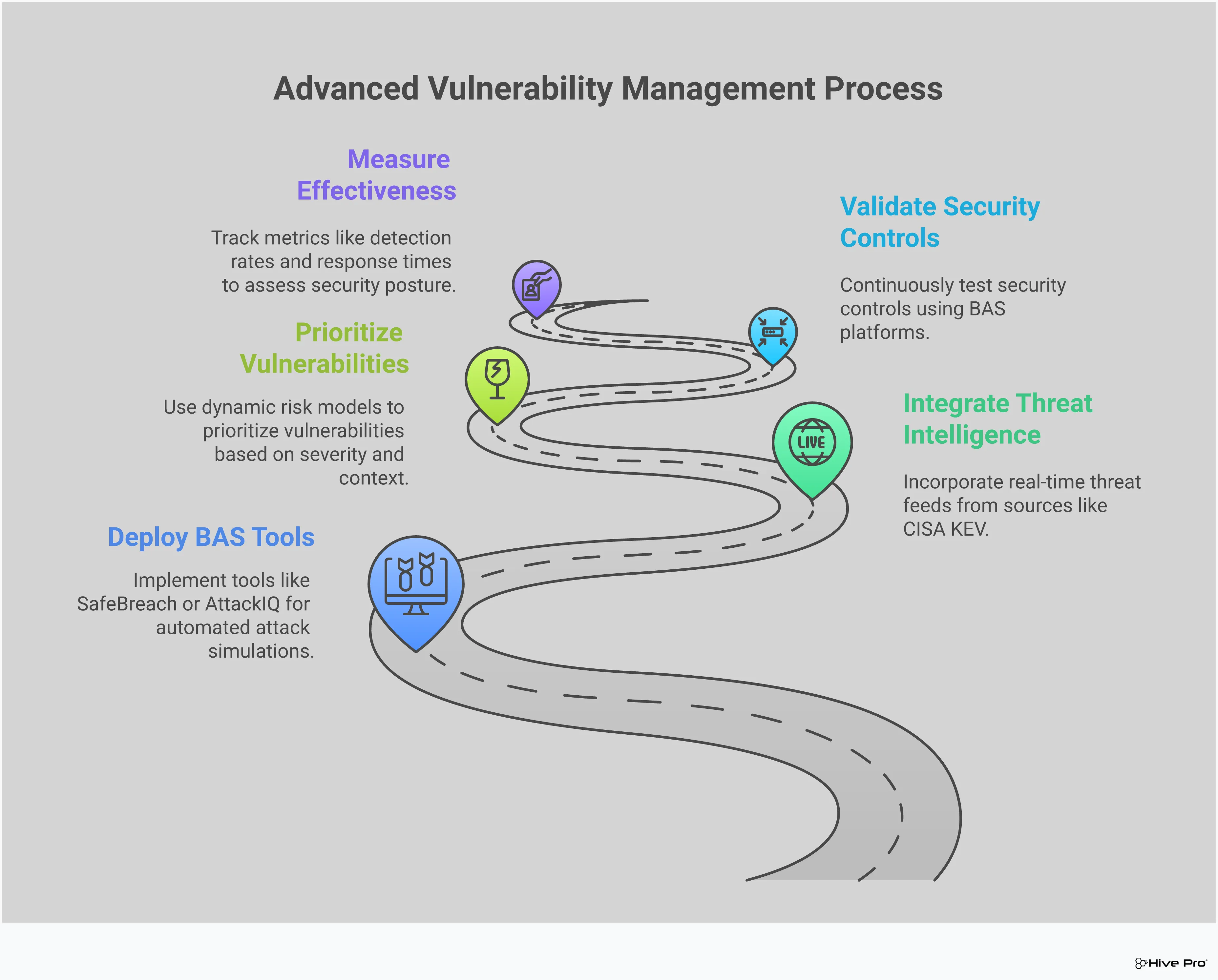
A solid vulnerability management program is great at finding weaknesses, but how do you know which ones truly put you at risk? And how can you be sure your security defenses will actually stop an attack in progress? This is where Breach and Attack Simulation (BAS) comes in. Instead of just reacting to a list of vulnerabilities, BAS lets you proactively test your defenses by running simulated attacks in a safe, controlled way. It’s like having a dedicated red team on call 24/7, constantly checking your security posture against the latest attack techniques.
By adding BAS to your strategy, you shift from a passive, “hope it works” approach to an active, evidence-based one. It helps answer critical questions like, “If we were targeted with this specific ransomware today, would our EDR stop it?” or “Is that critical vulnerability we patched last week really fixed?” This continuous validation gives you a real-time view of your security effectiveness, helping you find and fix gaps before a real attacker can exploit them. It connects the dots between a theoretical vulnerability and its actual, exploitable risk in your environment, allowing your team to focus on what matters most.
You’ve invested heavily in firewalls, endpoint detection, and other security tools. But are they configured correctly and working together as expected? BAS helps you answer that with confidence. By running automated, real-world attack scenarios, you can continuously validate your security controls and see exactly how they perform. Instead of relying on vendor claims or annual penetration tests, you get a constant feedback loop on your security posture. This gives you a unified, real-time view of your exposure from your code all the way to the cloud, showing you precisely where your defenses are strong and where they need attention.
Patching a vulnerability is only half the battle. The real question is: did the fix actually work? A successful patch doesn’t just mean the software is updated; it means the avenue of attack is closed. BAS tools allow you to test your remediation efforts by simulating the very attack the patch was meant to prevent. After your team applies a fix, you can run a targeted simulation to confirm the vulnerability is no longer exploitable. This crucial step closes the remediation loop, preventing a false sense of security and ensuring your hard work translates into a genuine reduction in risk before changes are pushed to a live environment.
Vulnerability scanners often produce a long list of issues, each with a theoretical risk score like CVSS. While helpful, these scores don’t account for your unique environment or compensating controls. A vulnerability with a “critical” score might be unexploitable in your network. This is where BAS changes the game. It moves beyond theoretical scores by attempting to exploit vulnerabilities, providing concrete proof of what an attacker could actually achieve. This process of validating exposures with simulated attacks gives you hard evidence, helping your team prioritize the fixes that address proven risks, not just potential ones.
Choosing a new vulnerability management tool is a big step, but the work doesn’t stop once you’ve made your decision. Implementation is where the rubber meets the road, and it often comes with a few common hurdles. Getting ahead of these challenges can make the difference between a tool that gathers dust and one that becomes an essential part of your security program. From wrestling with your tech stack to managing alert overload, here’s what you should prepare for.
A vulnerability management tool can’t operate in a silo. To be effective, it needs to communicate seamlessly with the other systems you already use, like your patch management software, SIEM, and ticketing platforms. The challenge is that these integrations can be complex and time-consuming to set up. If your new tool doesn’t play well with others, you’ll end up with data gaps and manual workflows that slow your team down. The goal is to create a smooth process from detection to remediation, and that requires a tool that can provide a unified view of your environment by connecting all the dots.
One of the biggest complaints about vulnerability scanners is the sheer volume of alerts they generate. It’s easy for security teams to become overwhelmed by a constant stream of notifications, many of which turn out to be false positives or low-risk issues. This alert fatigue can cause real, critical threats to get lost in the noise. The key challenge is finding a way to focus on what truly matters. Without smart vulnerability and threat prioritization, your team could spend valuable time chasing down minor issues while a major exposure goes unnoticed, making it difficult to get buy-in from engineering teams to fix things.
A new tool is only as effective as the people and processes that support it. Simply installing the software isn’t enough; you need to invest in training your team and refining your workflows. This often means creating a culture where security is a shared responsibility, not just the security team’s problem. Getting everyone on board and establishing clear procedures for handling vulnerabilities is crucial. Remember, vulnerability management isn’t a one-time project—it’s an ongoing process. It requires a continuous commitment to monitoring your total attack surface and adapting to an ever-changing threat landscape.
Selecting the right vulnerability management tool isn’t a one-size-fits-all decision. The best platform for a small business will differ from what a global enterprise needs. Your team’s size, the complexity of your IT environment, and your industry’s compliance demands all play a huge role in finding the perfect fit. Think about your specific challenges and goals. Are you struggling to see all your assets? Drowning in alerts with no clear path to remediation? Or trying to prove compliance to auditors? Answering these questions will help you zero in on a tool that solves your actual problems instead of just adding another dashboard to your stack.
If you’re running a small or medium-sized business, you need a tool that punches above its weight without requiring a dedicated team to manage it. Your top priority is getting comprehensive visibility. Make sure the tool can scan your entire environment—from on-premise servers and employee laptops to cloud instances and virtual machines. You can’t protect what you can’t see. Just as important is the ability to keep up with compliance. A good tool will help you follow key security rules and breeze through audits, generating the reports you need to prove you’re secure. Look for a platform that offers clear, actionable guidance so your team can fix issues quickly and focus on growing the business.
For large enterprise teams, vulnerability management is a game of scale and speed. With a massive attack surface, you need a tool that can cut through the noise and pinpoint the most critical threats. This is where up-to-date threat intelligence becomes non-negotiable. Your platform should tell you which vulnerabilities are actively being exploited in the wild, allowing you to focus your team’s limited time on the fixes that matter most. Automation is also essential. Look for tools that can automatically create remediation tickets or integrate seamlessly with your existing ITSM and SOAR platforms. The goal is to create a smooth, efficient workflow from detection to resolution, reducing manual effort and closing security gaps faster.
If you operate in a regulated industry like healthcare, finance, or government, compliance is a core part of your security program. Your vulnerability management tool must do more than just find flaws; it needs to help you meet strict legal and industry mandates like HIPAA or PCI-DSS. The right platform will generate audit-ready reports that clearly demonstrate your security posture to managers, executives, and auditors. Modern tools take this a step further by integrating compliance requirements directly into security workflows. This shifts you from stressful, periodic audits to a state of continuous compliance, where your security posture is always verified and documented.
Figuring out the cost of a vulnerability management tool can feel like trying to hit a moving target. Pricing isn’t always listed on a website, and it often depends on the size and complexity of your environment. Most vendors use a subscription model, but the final price tag is shaped by factors like the number of assets you need to cover, the specific features you require, and the level of support you choose.
The good news is that you have options. Most companies offer free trials, which are your best friend when it comes to making an informed decision. By understanding the common licensing models and knowing what to look for during a trial, you can find a tool that fits your technical requirements without breaking your budget. The goal is to find a solution that provides the most value by helping your team work more efficiently and effectively to reduce risk.
Free trials are your opportunity to take a tool for a test drive in your own environment. This is your chance to move beyond marketing claims and see how the platform actually performs. Many vulnerability management tools offer trials, giving you a hands-on way to evaluate their features and user interface before you commit. To get the most out of this period, go in with a plan. Don’t just run a default scan; test the features that matter most to your team. Can it integrate with your existing security stack? How intuitive are the reporting and analytics dashboards? A well-structured trial helps you confirm if a tool can truly address your specific security challenges.
Most vulnerability management tools are sold as annual subscriptions, and the price is typically based on the number of assets you need to protect. An “asset” could be an IP address, a server, a cloud instance, or a web application, so be sure to clarify this with each vendor. For example, some vendors might charge around $3,500 for a one-year subscription covering 100 assets. You’ll often find discounts for multi-year commitments, which can offer significant savings if you’re confident in your choice. When getting a quote, ask about any potential hidden costs, such as add-on fees for premium features, API access, or dedicated support.
Choosing the right tool isn’t just about finding the lowest price—it’s about securing the best value for your organization’s needs. Start by outlining your essential requirements. Do you need comprehensive coverage that includes cloud environments and web applications? How important are automation capabilities for streamlining remediation workflows? A platform with strong vulnerability and threat prioritization can save your team countless hours by focusing their efforts on the risks that matter most. Consider your organization’s growth, too. The right tool should not only fit your budget today but also have the ability to scale with you tomorrow.
Why can’t I just rely on CVSS scores to prioritize vulnerabilities? Relying only on CVSS scores is like a doctor treating every fever the same way, regardless of the cause. A high score tells you a vulnerability is theoretically severe, but it doesn’t tell you if it’s a real threat to your organization right now. Threat intelligence adds the missing context, showing you which vulnerabilities have active exploits in the wild or are being used in current attack campaigns. This allows your team to focus on the handful of issues that pose an immediate danger instead of getting lost in a sea of thousands of “critical” alerts.
What’s the difference between finding vulnerabilities and validating them? Finding a vulnerability is like discovering a door has a weak lock. Validating it is like actually trying to jiggle the handle to see if it will open. Breach and Attack Simulation (BAS) performs that validation step. It safely simulates real-world attack techniques to confirm if a vulnerability is truly exploitable in your specific environment. This gives you concrete proof of risk, helping you separate the theoretical weaknesses from the ones that an attacker could actually use to break in.
My team is small. Is an enterprise-level platform too much for us? Not necessarily. The key is to find a platform that scales to your needs and, more importantly, makes your team more efficient. A modern tool with strong automation and clear remediation guidance can act as a force multiplier for a small team. Instead of creating more work, it streamlines the process by integrating with your existing tools, automatically creating tickets, and showing you exactly which fixes will have the biggest impact. This frees your team from manual research and helps them focus on what matters.
How does a vulnerability management tool help with more than just finding problems? A modern tool does much more than just scan and report. It serves as the central nervous system for your entire exposure management program. It should provide clear, step-by-step instructions on how to fix the problems it finds, saving your team from having to research solutions. It also integrates with your ticketing and patch management systems to create a smooth workflow from discovery to remediation. Finally, it provides clear reporting that helps you track your progress and communicate your security posture to leadership.
Is threat intelligence just another data feed, or does it actually change our workflow? When integrated properly, threat intelligence fundamentally changes your workflow for the better. Instead of starting your day with a massive, unsorted list of vulnerabilities, your team can immediately see the top 5 or 10 issues that are being actively exploited by attackers. This transforms your team’s approach from a reactive, compliance-driven cycle of patching to a proactive, threat-informed defense. It ensures your most valuable time and resources are spent on fixing the problems that pose a genuine, immediate risk to the business.