Comprehensive Threat Exposure Management Platform
Trying to defend against every potential malware attack is like trying to boil the ocean. You can’t be everywhere at once, and treating every vulnerability as a top priority is a surefire way to burn out your team. The old way of reacting to every alert simply doesn’t scale. A modern defense strategy is about precision, not just volume. It’s about understanding which threats are actively being exploited in the wild and focusing your efforts there. This guide will show you how to build a focused, intelligence-driven program for malware threat management, helping you neutralize the most imminent risks before they can impact your business.
Let’s start with the basics. “Malware” is simply short for “malicious software.” Think of it as any piece of code or program intentionally designed to cause harm. Its goals can range from disrupting your operations and damaging your systems to stealing sensitive data from your network. Understanding malware isn’t just an IT issue; it’s a fundamental business risk. To effectively manage this threat, you first need to understand what you’re up against, how it operates, and the potential damage it can inflict on your organization. A solid grasp of these fundamentals is the first step toward building a proactive defense strategy that protects your assets and reputation from the ground up.
Malware isn’t a single entity; it’s a diverse family of threats, each with its own method of attack. You’ve likely heard of the major players: ransomware that holds your data hostage, spyware that secretly collects information, and viruses that replicate and spread to other systems. But the list goes on to include adware, botnets, Trojans, worms, and even more sophisticated threats like rootkits and cryptojacking software. Each type exploits different weaknesses and requires a unique defensive approach. Recognizing the different kinds of malware is crucial because you can’t fight an enemy you don’t understand. Knowing their characteristics helps you tailor your security controls and response plans effectively.
Malware needs a way to get inside your environment, and attackers have plenty of tricks up their sleeves. The most common entry point is often a deceptive email, a tactic known as phishing, which tricks an employee into clicking a malicious link or opening an infected attachment. Other popular methods include exploiting unpatched software vulnerabilities, distributing infected files through sketchy websites, or even using compromised USB drives. Essentially, malware preys on both technical gaps and human error to infiltrate your network. This is why a comprehensive attack surface management strategy is so important—it helps you identify and close these potential entry points before they can be used against you.
A malware infection is far more than a technical headache; it can have severe and lasting consequences for your entire business. The most immediate impact is often financial, stemming from operational downtime, recovery costs, and potential regulatory fines. Then there’s the risk of a data breach, which can expose sensitive customer or corporate information and lead to a complete loss of trust. Beyond the direct costs, a successful attack can cripple your day-to-day operations and cause significant reputational damage that takes years to repair. The business impact of malware underscores why proactive threat management isn’t just a good idea—it’s essential for survival.
To build a solid defense, you first need to know what you’re up against. The world of malware is constantly shifting, with attackers refining their techniques and creating new variants. However, most of the threats you’ll encounter fall into a few major categories, each with its own distinct way of causing chaos. Think of these as the primary weapons in an attacker’s arsenal. Understanding how they work is the first step toward recognizing and neutralizing them before they can do real damage to your organization.
From holding your data hostage to silently siphoning off sensitive information, modern malware is designed for maximum impact. It’s not just about disrupting operations; it’s about financial extortion, corporate espionage, and weaponizing your own infrastructure against you. Getting familiar with the most common and dangerous types of malware—like ransomware, spyware, trojans, and botnets—gives you the foundational knowledge you need to build a more resilient security posture. Let’s break down the heavy hitters that your security team needs to be prepared to face.
Ransomware is exactly what it sounds like: a digital shakedown. This type of malware works by encrypting your files or entire systems, making them completely inaccessible. The attackers then demand a hefty payment, usually in cryptocurrency, in exchange for the decryption key. A successful attack can lead to devastating consequences, including “financial losses, data breaches, operational problems, and reputation damage.” It’s a direct and aggressive threat that can bring a business to a grinding halt.
Modern ransomware attacks have also evolved to include double-extortion tactics. Before encrypting your data, attackers will often steal a copy. If you refuse to pay the ransom, they threaten to leak the sensitive information publicly. This adds another layer of pressure, turning a business continuity problem into a massive data privacy crisis.
If ransomware is the loud, aggressive intruder, spyware is the silent thief who slips in unnoticed. Its primary goal is to secretly gather information from your devices. This can include anything from keystrokes and login credentials to browsing habits and financial details. Attackers use spyware to “steal private information (like passwords or bank details),” and it often operates completely in the background, making it incredibly difficult to detect without specialized tools.
The danger of spyware lies in its stealth. By the time you realize it’s there, your most sensitive corporate or personal data may have already been compromised. This information can be sold on the dark web, used for identity theft, or leveraged for more targeted attacks against your organization.
Named after the mythical Trojan Horse, this type of malware disguises itself as legitimate software to trick you into installing it. You might think you’re downloading a useful utility or a software update, but you’re actually opening the door for a malicious payload. Once inside, a Trojan can perform a variety of harmful actions. It might install other forms of malware, create a backdoor for remote access, or silently steal your data.
This deceptive nature makes Trojans a particularly effective delivery mechanism for other threats. An employee might accidentally install a Trojan, which then downloads and executes a ransomware payload, kicking off a full-blown security incident. Understanding that malicious software often relies on this kind of social engineering is key to training your team to spot potential threats.
Some malware isn’t interested in your data—it’s after your computer’s resources. Botnets and cryptojacking are two prime examples. A botnet is a network of infected computers, or “bots,” that are controlled by a single attacker. This army of compromised devices can be used to launch massive distributed denial-of-service (DDoS) attacks, send out spam, or steal data on a grand scale. Your systems could be participating in a cyberattack without you even knowing it.
Cryptojacking is a more recent threat that hijacks your system’s processing power to mine for cryptocurrency. While it might not steal your files, it can dramatically slow down your systems, increase energy consumption, and cause wear and tear on your hardware. Both threats turn your own assets against you, making them a drain on resources and a potential liability.
Malware doesn’t just appear out of thin air. It needs a delivery mechanism—an open door or a cracked window—to get into your systems. Attackers have a whole toolkit of methods, known as attack vectors, to sneak their malicious code past your defenses. Understanding these common entry points is the first step in learning how to block them. From a cleverly disguised email to a compromised software update, knowing what to look for can make all the difference in keeping your organization secure.
The inbox remains one of the most popular gateways for malware. Attackers use phishing campaigns that send deceptive emails with malicious links or attachments. These messages are often designed to look like they’re from a trusted source—a bank, a well-known software vendor, or even a colleague. The goal is to create a sense of urgency or curiosity, tricking an employee into clicking a link or downloading a file that unleashes malware. It’s a simple but incredibly effective tactic that preys on human error, making it a persistent threat for security teams to manage.
You don’t always have to click on something to get infected. Sometimes, just visiting the wrong website is enough. Attackers can inject malicious code into legitimate but poorly secured websites, turning them into traps. When you visit one of these compromised websites, malware can be automatically downloaded to your device without you even knowing—a technique called a “drive-by download.” This vector also includes downloading software or files from untrusted sources, which can have malware bundled inside, waiting to be installed along with the program you actually wanted.
In an increasingly connected world, it’s easy to forget about physical threats. However, malware can easily spread through infected USB drives and other portable storage devices. An employee might find a USB stick in the parking lot and plug it into their work computer out of curiosity, or a vendor might unknowingly use an infected drive to transfer files. Once connected, the device can introduce malware directly onto the network, often bypassing perimeter security controls that are focused on internet-based threats. This makes managing physical media just as important as monitoring network traffic.
Some of the most sophisticated attacks exploit the trust you have in your software vendors and partners. In supply chain attacks, threat actors compromise a trusted software provider and inject malicious code into a legitimate software update. When you install the update, you unknowingly install the malware, too. Because the update comes from a source you trust, it’s often not scrutinized by traditional security tools. This method allows attackers to infiltrate thousands of organizations at once, making it a highly efficient and dangerous attack vector that requires a deep understanding of your entire software ecosystem.
Catching malware early is a lot like noticing a leaky pipe before it floods the basement—the sooner you spot the signs, the less damage you have to deal with. While modern security tools do a lot of the heavy lifting, your team’s vigilance is an irreplaceable line of defense. Attackers often rely on their activity going unnoticed, blending into the background noise of daily operations. Knowing the subtle (and not-so-subtle) clues of an infection helps you shut down an attack before it escalates into a full-blown crisis.
Think of your systems and networks as living things; they have normal rhythms and behaviors. When something is off, they often show symptoms. The key is training your team to recognize these symptoms for what they are: potential indicators of compromise. From a single laptop acting up to strange patterns in your network traffic, every anomaly is a thread worth pulling. By staying observant, you can move from a reactive posture to a proactive one, catching threats before they have a chance to execute their final payload.
One of the first places malware shows itself is in system performance. If a user reports their computer is suddenly running at a snail’s pace or crashing frequently, don’t just write it off as an old machine. Malware often consumes significant CPU and memory resources, which directly impacts performance. Keep an eye out for a sudden barrage of unwanted pop-up ads, as this is a classic sign of adware. You should also be on alert if your antivirus or firewall software suddenly gets turned off without your input; some malware is designed to disable the very tools meant to stop it. A unified view of your cyber risks can help you correlate these individual performance issues across your organization.
Malware needs to communicate to be effective. It might be calling home to a command-and-control server, trying to spread to other devices on your network, or exfiltrating your data. This creates network traffic that you can often spot if you know what to look for. Watch for unexpected spikes in internet usage, especially at odd hours. Firewalls and endpoint detection and response (EDR) tools can flag connections to known malicious IP addresses or domains. If your web browser is suddenly redirecting to strange websites you never intended to visit, that’s another major red flag. These are signs that something is operating on your network without your permission, making it critical to validate your security controls regularly.
Ultimately, most malware is after your data. The most obvious sign of trouble is a ransom note appearing on a screen, indicating that your files have been encrypted by ransomware. But other signs can be more subtle. You might notice that files are missing, have been modified without authorization, or you can no longer access them. The sudden appearance of new files, icons, or programs you don’t recognize is another telltale sign that an intruder has set up shop. These symptoms can cause serious operational problems and data breaches, so investigating any unusual file activity immediately is crucial for protecting your business and its reputation.
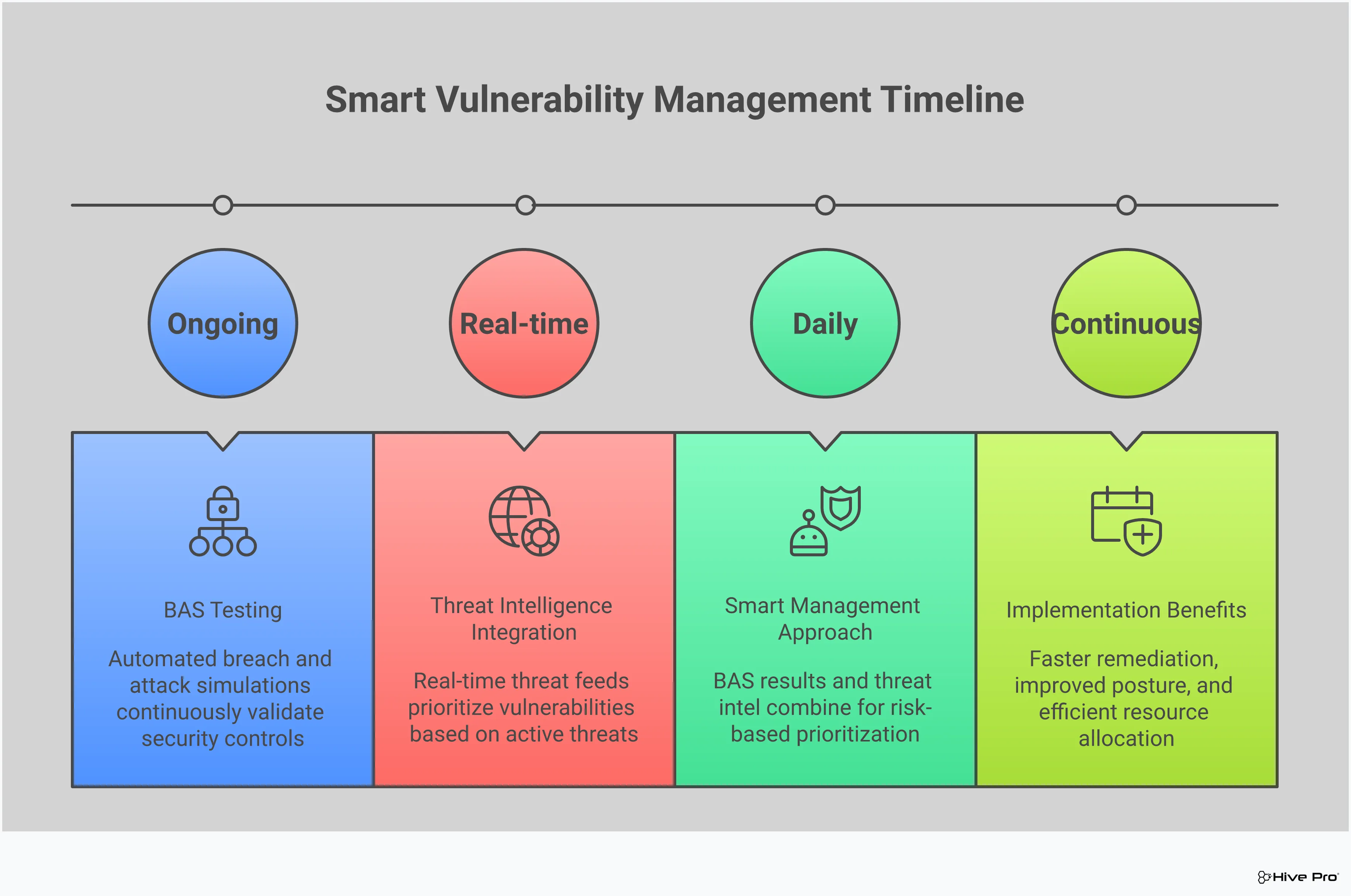
You wouldn’t wait for a real fire to test your smoke alarms and evacuation plan, right? The same logic applies to your cybersecurity defenses. You need to know if they’ll hold up before a real malware attack hits. This is where Breach and Attack Simulation (BAS) comes in. It’s a way to continuously and safely test your security controls against the kinds of attacks you’re likely to face in the wild.
Think of a BAS platform as a friendly sparring partner for your security team—it helps you find your weak spots in a controlled setting so you can get stronger. Instead of just assuming your security stack is working, you can actually prove it. When it comes to malware, BAS can simulate common delivery methods like phishing emails or the exploitation of known vulnerabilities. This gives you a clear picture of where an attacker could break through, allowing you to make targeted improvements. This proactive approach is a core part of modern adversarial exposure validation and is key to shifting from a reactive to a proactive security posture. By automating these tests, you get a constant, real-time assessment of your readiness, moving beyond periodic penetration tests to a state of continuous assurance.
The biggest advantage of BAS is that you can mimic real-world attack scenarios without any of the real-world risk. These tools allow you to safely simulate attacks that replicate the latest malware strains and attacker tactics, all within your production environment but without causing actual damage. It’s the closest you can get to experiencing a real attack, helping your team understand exactly how your defenses would perform when it counts. This isn’t a theoretical exercise; it’s a practical, hands-on test of your readiness against the threats you’re most likely to face.
You’ve invested a lot in your security tools, but are you sure they’re configured correctly and catching what they’re supposed to? BAS helps you answer that question with confidence. By running simulated attacks, you can validate your detection capabilities and test how well your security systems identify and respond to malicious activity. This process ensures your detection mechanisms are functioning as intended. If a simulated attack goes unnoticed by your EDR or SIEM, you know you have a critical blind spot to address before a real attacker finds it and waltzes right in.
The ultimate goal of testing is to improve. Regularly conducting breach and attack simulations helps you find security gaps before they can be exploited by malicious actors. Whether it’s a misconfigured firewall, a missing patch, or a flaw in your incident response process, BAS shines a bright light on it. By proactively identifying and addressing these vulnerabilities, you can systematically strengthen your security posture. This continuous feedback loop is essential for managing your total attack surface and staying one step ahead of attackers looking to deploy malware.
Let’s be honest: the sheer volume of vulnerabilities discovered every day is overwhelming. If your team tried to patch every single one, you’d never do anything else. This is where a reactive approach to vulnerability management falls short. You can’t treat all threats as equals because, in reality, they aren’t. A smarter approach is to use actionable threat intelligence to see your environment through an attacker’s eyes. What are they targeting right now? Which vulnerabilities are actively being used to deliver malware?
Answering these questions helps you shift from a frantic, “patch everything” mindset to a focused, proactive strategy. Threat intelligence cuts through the noise of endless vulnerability alerts and points you directly to the ones that pose a clear and present danger to your organization. It provides the context you need to make informed decisions, ensuring your team’s valuable time and resources are spent neutralizing the most imminent threats first. This is the foundation of a modern threat exposure management program—one that doesn’t just find problems but helps you fix the right ones at the right time.
To defend against malware, you first need to understand how its creators operate. Cyber Threat Intelligence (CTI) gives you that crucial insight. It’s not just a list of bad IP addresses or malware signatures; it’s a deep understanding of the threat landscape as it exists today. CTI helps you see which malware families are trending, what industries are being targeted, and which specific vulnerabilities are being exploited in the wild.
Think of it as your own private intelligence briefing. Instead of guessing what might happen, you get timely, relevant data on active campaigns and attacker TTPs (tactics, techniques, and procedures). This knowledge, often curated by expert teams like HiveForce Labs, allows you to anticipate an attacker’s next move and prepare your defenses accordingly, making your security posture much stronger.
Once you know what attackers are doing, you can apply that knowledge to your own environment. A vulnerability’s CVSS score tells you how severe it could be, but threat intelligence tells you how severe it is in the real world. A vulnerability with a perfect 10.0 CVSS score that isn’t being exploited is arguably less of a priority than a 7.5 that is actively being used in a widespread ransomware campaign.
This is the core of threat-informed prioritization. It helps you filter out the theoretical risks and focus on the vulnerabilities that attackers are actually using to deploy malware. By correlating external threat data with your internal vulnerability scans, you can create a to-do list that is based on genuine risk, not just arbitrary scores. This eliminates the noise and allows your team to concentrate on fixing the issues that truly matter.
With a clear, prioritized list in hand, your remediation efforts become incredibly efficient. You’re no longer just patching vulnerabilities; you’re actively closing the windows that attackers are trying to climb through right now. Actionable threat intelligence provides the final piece of the puzzle, guiding your team to neutralize the most critical exposures before they can be exploited.
This proactive cycle—identifying assets, understanding threats, prioritizing vulnerabilities, and directing remediation—is what stops malware attacks before they can start. It ensures that your security measures are always aligned with the current threat landscape. By focusing on imminent threats, you can be confident that you are systematically reducing your attack surface and delivering continuous protection against the most likely and impactful malware campaigns.
Waiting for a malware infection to happen is a recipe for disaster. A proactive prevention strategy is about building a resilient security posture that anticipates and blocks threats before they can cause damage. It means shifting from a reactive cleanup crew to a forward-thinking defense team. This involves a combination of robust technology, diligent processes, and, most importantly, well-informed people. By focusing on prevention, you can significantly reduce your attack surface and minimize the impact of any threats that do manage to slip through.
A single line of defense is never enough. Effective malware prevention relies on a layered security approach, also known as defense-in-depth. Think of it like securing a castle with a moat, high walls, and guards at every gate. Your strategy should combine multiple methods, including signature-based detection for known threats and behavioral analysis to spot novel attacks. By implementing firewalls, endpoint protection, email security gateways, and intrusion detection systems, you create overlapping fields of view. This ensures that if one layer fails, another is there to catch the threat. A unified platform can help you manage these layers and see the full picture of your exposure.
Malware loves to exploit known vulnerabilities in outdated software. One of the most effective, yet often overlooked, prevention tactics is a rigorous patch management program. Always keep your operating systems, applications, and firmware updated to close the security gaps attackers are looking for. But patching isn’t the only piece of the puzzle. Enforcing strong access controls, like multi-factor authentication (MFA), is critical. According to research, implementing MFA can stop the vast majority of identity-based attacks. Using a vulnerability prioritization tool helps your team focus on fixing the most critical weaknesses first, making your patching efforts more efficient and impactful.
Your employees can be either your weakest link or your strongest defensive asset. Investing in regular, engaging cybersecurity awareness training transforms your team into a “human firewall.” This training should empower them to be vigilant and proactive in spotting and reporting potential risks, like phishing emails or suspicious downloads. A successful program goes beyond a one-time webinar; it builds a security-conscious culture. When your team understands the “why” behind security policies and feels like part of the solution, they become an active and essential layer in your malware prevention strategy.
In today’s complex IT environments, the old model of a trusted internal network is obsolete. Adopting a “Never Trust, Always Verify” or Zero Trust mindset is essential. This approach assumes that threats can exist both outside and inside your network. Every user, device, and application must be authenticated and authorized before being granted access to resources. This means strictly enforcing the principle of least privilege, ensuring users only have access to what they absolutely need to do their jobs. Part of this approach also means being prepared for the worst by having a clear incident response plan ready to go, so your team knows exactly what to do when a security event occurs.
Even with the most robust prevention strategies, you have to be prepared for the day an attack slips through. Having a clear, practiced incident response plan is what separates a minor hiccup from a full-blown catastrophe. It’s not about admitting defeat; it’s about being a realist and ensuring your team can act decisively when the pressure is on. A good plan removes the guesswork and panic, allowing your team to follow a structured process to contain the damage, eradicate the threat, and get back to business safely. Think of it as your playbook for game day—you don’t want to be figuring out the plays in the middle of the fourth quarter.
The moment you suspect a malware infection, your first move is always containment. The goal is to stop the bleeding. You need to isolate the infected systems from the rest of the network immediately. This means disconnecting the affected computers or servers from the internet, your internal network, and any other connected devices. This critical first step prevents the malware from spreading laterally to other assets, encrypting more files, or exfiltrating more data. As experts at Microsoft Security advise, the priority is to stop the malware from causing further harm. Don’t hesitate—the faster you can build a fence around the problem, the smaller the problem will be.
Once the immediate threat of spread is neutralized, your focus shifts to investigation. You need to identify what you’re dealing with. This involves more than just naming the malware strain; you need to understand how it got in, what systems it has touched, and what its capabilities are. Was it a phishing email? A vulnerable application? Knowing the root cause is essential for closing the door behind it. After you have a clear picture of the infection, you can move to eradication. This means using specialized security tools to thoroughly remove every trace of the malware from all affected systems to ensure it can’t reactivate later.
After you’ve successfully kicked the malware out, it’s time to rebuild. The safest and most reliable way to do this is to restore your systems and data from clean, recent backups. Don’t try to clean infected files or systems unless you have no other choice, as malware can leave behind hidden backdoors. Wiping the affected systems and restoring from a known-good state is the only way to be confident that the threat is truly gone. This step highlights the importance of a rigorous backup strategy—your ability to recover quickly and completely depends on the quality and integrity of your backups.
Technical recovery is only part of the response. As you work through the remediation steps, you must also manage communication. It’s crucial to notify stakeholders according to the procedures laid out in your incident response plan. This includes keeping leadership informed, alerting legal or compliance teams if necessary, and preparing for any external communications. Clear, timely updates help manage expectations and maintain trust. This final step also kicks off the post-incident review, where your team can analyze what happened, what went well, and how you can strengthen your defenses to prevent a similar attack in the future.
Even with the best intentions, managing malware threats can feel like an uphill battle. Security teams are often stretched thin, dealing with a flood of alerts from a patchwork of different tools. It’s easy to get bogged down in the day-to-day noise and lose sight of the bigger picture. The good news is that these challenges are common, and more importantly, they are solvable.
The key is to shift from a reactive, firefighting mode to a proactive, strategic approach. This means getting smarter about how you use your resources, streamlining your toolset, and focusing on the threats that truly matter. It also involves recognizing that your people—not just your technology—are a critical part of your defense. Let’s break down some of the most frequent hurdles security teams face and discuss practical ways to clear them for good. By addressing these issues head-on, you can build a more resilient and effective malware management program.
Many organizations struggle with a shortage of cybersecurity experts, and the ones they have are often overworked. When your team is small, you can’t afford to waste time deciphering confusing reports or manually correlating data from different systems. The solution isn’t necessarily to hire more people—it’s to equip your current team with tools that act as a force multiplier. A platform that provides a unified view of cyber risks in a single place can bridge this gap. By automating data collection and presenting clear, prioritized insights, you empower your team to make faster, more informed decisions without needing an army of analysts.
Does your security stack look like a collection of disconnected gadgets? You’re not alone. “Tool sprawl” happens when organizations adopt multiple point solutions for different security functions, leading to visibility gaps and operational headaches. A more effective approach is to consolidate key functions into a single, integrated platform. This streamlines your security efforts by providing a complete suite for end-to-end exposure management, from attack surface scanning to remediation guidance. By bringing everything together, you reduce complexity, eliminate blind spots, and allow your team to work more efficiently instead of constantly switching between different interfaces.
When everything is a high-priority alert, nothing is. Security teams are drowning in notifications, making it nearly impossible to distinguish real threats from false positives. This “alert fatigue” leads to burnout and critical incidents being missed. To solve this, you need intelligent vulnerability and threat prioritization. Instead of just flagging every potential issue, a modern threat exposure management platform uses threat intelligence to identify which vulnerabilities are actively being exploited in the wild. This allows you to focus your limited time and resources on fixing the gaps that pose an immediate and genuine risk to your organization.
Technology is only one piece of the puzzle. Your employees can either be your weakest link or your strongest line of defense. Implementing ongoing cybersecurity awareness training is one of the most effective ways to reduce malware risk. When your team knows how to spot a phishing email, understands the danger of suspicious downloads, and feels empowered to report potential threats, you build a powerful human firewall. A successful program isn’t about a one-time lecture; it’s about creating a security-conscious culture where everyone understands their role in protecting the organization.
Building a strong defense against malware isn’t about finding one magic tool. It’s about creating a layered, intelligent tech stack where each component works together. A modern approach moves beyond basic prevention and gives you the visibility and control needed to proactively manage your threat exposure. Think of it as your security command center, equipped with the right technology to not only block attacks but also to understand your weaknesses and anticipate the next threat. Here are the core components that form the foundation of an effective malware management strategy.
Traditional antivirus is like a bouncer with a list of known troublemakers—it’s good, but it can’t spot a new threat. That’s where Endpoint Detection and Response (EDR) comes in. EDR solutions act as continuous surveillance for your endpoints, like laptops and servers, constantly monitoring for suspicious activities and behaviors, not just known malware signatures. This allows your team to detect advanced threats that might otherwise go unnoticed. When an EDR tool spots something unusual, it provides the detailed data needed for a swift investigation and response, helping you understand exactly what malware is on your system and how it got there. It’s a critical layer for catching sophisticated attacks in their tracks.
With so many security tools generating data, it’s easy to get overwhelmed. A Threat Exposure Management (TEM) platform cuts through the noise by unifying your security data into a single, coherent view. Instead of juggling different dashboards, a TEM solution gives you a complete picture of your cyber risks across your entire attack surface. Platforms like Hive Pro’s Uni5 Xposure integrate asset visibility with actionable threat and vulnerability intelligence. This helps you move from a reactive cycle of patching vulnerabilities to proactively reducing your overall exposure. It connects the dots between a specific weakness, the threats targeting it, and the business impact, so you can focus on what truly matters.
You can’t protect assets you don’t know you have. That’s why continuous monitoring and vulnerability scanning are fundamental to modern malware defense. Malware often exploits known, unpatched vulnerabilities, making visibility into your full attack surface a top priority. This isn’t a quarterly check-in; it’s an ongoing process of discovery and assessment. By continuously revealing your exposure, you can identify and prioritize weaknesses before attackers do. This proactive stance allows you to manage your security posture in real-time, ensuring that new devices, cloud instances, and applications don’t introduce blind spots that could become the entry point for the next malware attack. It’s about maintaining constant vigilance.
Even with the best defenses, you have to plan for the possibility of a breach. Network segmentation is your containment strategy. By dividing your network into smaller, isolated zones, you can limit an attacker’s ability to move laterally if they compromise one area. Think of it as closing bulkhead doors on a ship to contain a flood. Paired with strong access controls, this becomes even more powerful. Implementing the principle of least privilege—giving users and systems only the access they absolutely need—drastically reduces the attack surface. If a user account is compromised, the damage is contained because the attacker can’t use it to access sensitive parts of the network. These controls are essential for minimizing the impact of a successful malware infection.
My team is overwhelmed with vulnerability alerts. Where should we even start? This is a huge and completely valid challenge. The key is to stop trying to fix everything at once and instead focus on what attackers are targeting right now. A vulnerability’s technical severity score doesn’t tell the whole story. You need threat intelligence to add context, showing you which weaknesses are actively being used in real-world malware campaigns. This allows you to prioritize the vulnerabilities that pose a clear and present danger, ensuring your team’s effort is spent on neutralizing the most imminent threats first.
We already have antivirus and a firewall. Why do we need more tools? Think of antivirus and firewalls as the locks on your doors and windows—they’re essential, but they can’t stop a clever intruder who finds another way in. Modern security is about layered defense. Tools like Endpoint Detection and Response (EDR) act like motion sensors inside the house, looking for suspicious behavior, not just known threats. A Threat Exposure Management platform then ties all of that information together, giving you a single view of your entire security posture so you can see the full picture instead of just looking at individual alerts.
How can we know if our security controls will actually work during a real attack? You test them, but not just once a year with a traditional penetration test. The best way to build confidence in your defenses is to challenge them continuously. Breach and Attack Simulation (BAS) platforms do exactly that. They safely and automatically run simulated attacks against your live environment, mimicking the tactics real attackers use. This gives you a constant, real-time report card on your security readiness, allowing you to find and fix gaps before an actual attacker has the chance to exploit them.
What’s the most critical first step to take during a suspected malware incident? Containment. The absolute first thing you must do is isolate the infected device from the network. Disconnect its ethernet cable, turn off its Wi-Fi—do whatever it takes to cut it off from everything else. This single action prevents the malware from spreading to other systems, encrypting shared files, or sending more data out. Before you investigate or try to remove anything, you have to stop the bleeding. This prevents a single compromised laptop from turning into a company-wide crisis.
Beyond technology, what’s the most effective way to reduce our risk from malware? Build a strong security culture. Your employees are your first and last line of defense, and they need to be empowered to be a part of the solution. This goes far beyond a yearly training video. It means creating an environment where people understand the risks, know how to spot phishing attempts or suspicious downloads, and feel comfortable reporting anything that seems off without fear of blame. When your entire team is vigilant, they become a powerful human firewall that technology alone can’t replicate.