Comprehensive Threat Exposure Management Platform
 Critical Threat Research : Middle-East at WAR: The Rapidly Escalating Iranian Cyber Threat Download the Report Critical Threat Research : Middle-East at WAR: The Rapidly Escalating Iranian Cyber Threat Download the Report
Running short on time but still want to stay in the know? Well, we’ve got you covered! We’ve condensed all the key takeaways into a handy audio summary. Our AI-driven podcasts are fit for on the go.
Recently, Internet Explorer (IE) Mode has been weaponized by threat actors through multiple zero-day exploits.
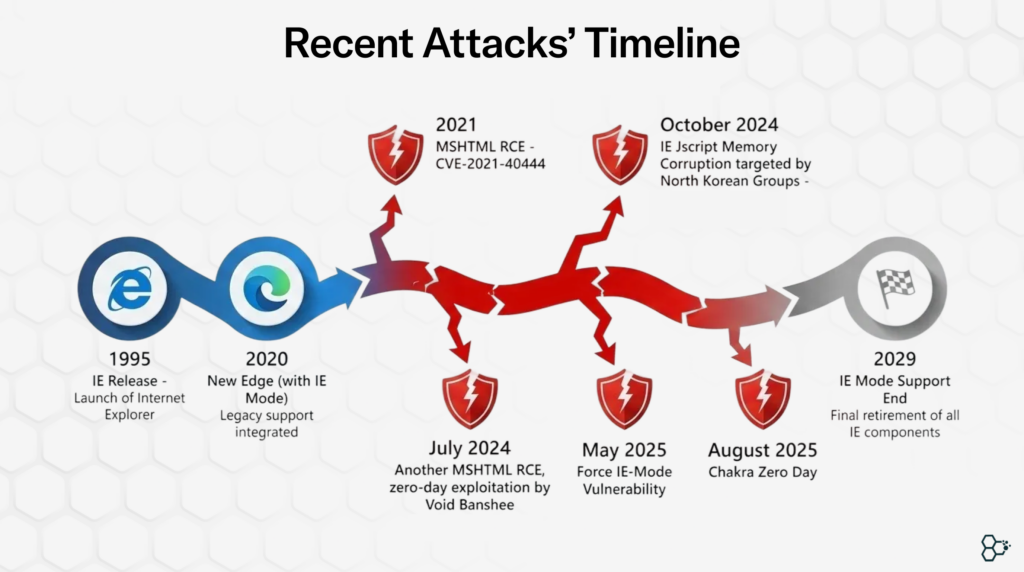
But a key question to ponder upon, why does internet explorer mode still exist?
It’s a Legacy trap: Organizations across the globe have invested decades into building internal web applications specifically for Internet Explorer. These aren’t new applications—they’re often mission-critical systems built on older technologies like ActiveX controls, Flash, Silverlight, and legacy JavaScript frameworks that modern browsers intentionally abandoned for security reasons.
In January 2020, Microsoft released its new Chromium-based Edge browser, which included an Internet Explorer (IE) Mode. This feature provided a balanced solution for businesses that relied on legacy web applications. With IE Mode, users could benefit from the modern, secure browsing experience of the Chromium platform, while organizations could configure specific domains to render using the Internet Explorer 11 engine.
It was a win-win for Microsoft with an assumption that by limiting IE Mode to designated sites, the attack surface would stay minimal. Malicious sites wouldn’t be able to trigger it, and users would only enable it intentionally for trusted, business-critical pages. That assumption proved wrong.
Enterprises operating legacy systems with IE Mode enabled at their endpoints are the ones most at risk. These organizations should exercise extreme caution, as the August zero-day vulnerability likely remains unpatched, with the CVE still undisclosed by Microsoft. Compounding the risk, IE Mode will continue to be supported until 2029, keeping these outdated, vulnerable applications within otherwise secure environments.Although Microsoft has introduced additional restrictions around IE Mode, it remains uncertain whether these measures are sufficient. Embedding a legacy, vulnerability-prone technology within a modern browser raises serious questions about the limits of trust in contemporary browser security controls.
https://microsoftedge.github.io/edgevr/posts/Changes-to-Internet-Explorer-Mode-in-Microsoft-Edge