Comprehensive Threat Exposure Management Platform
Traditional vulnerability management can feel like a never-ending game of whack-a-mole. You patch one critical issue, and three more pop up, leaving your team feeling burnt out and perpetually behind. A modern dashboard changes the game entirely. By integrating real-world threat intelligence, it helps you move beyond simple CVSS scores to understand which vulnerabilities pose a genuine, immediate threat to your organization. This shift allows you to build a proactive security program focused on what attackers are actually exploiting. The Ultimate CISO Dashboard (viewing all vulnerabilities in a single place) is the foundation for this approach, giving you the context to prioritize effectively.
Let’s be honest: as a security leader, you’re constantly swimming in data from dozens of tools. Vulnerability scanners, firewalls, and endpoint detection systems all generate a flood of alerts and metrics. A CISO dashboard cuts through that noise. Think of it as your security program’s command center. It’s a centralized tool that pulls all your critical security data into one place, translating complex technical details into clear, visual insights that are easy to understand at a glance.
The real value isn’t just having data in one spot; it’s about communication and strategy. Your board and executive team don’t speak in CVEs or firewall rule numbers. They want to understand risk in terms of business impact. A well-designed dashboard helps you bridge that gap. It allows you to answer their toughest questions with confidence: Are we secure? Where are our biggest risks? Is our security investment paying off? It transforms your role from a technical manager into a strategic business partner, equipping you to lead conversations about risk, investment, and overall security posture with data-driven clarity.
A CISO dashboard’s main job is to create a single source of truth. Instead of juggling spreadsheets and logging into multiple platforms to piece together a report, you get a consolidated view of your entire security landscape. This centralized hub aggregates data from across your security stack, presenting key performance indicators (KPIs) and metrics in an easily digestible format. This gives you and your stakeholders a clear, up-to-the-minute snapshot of your organization’s security health.
This approach saves an incredible amount of time and reduces the risk of human error. More importantly, it provides a unified view of cyber risks that everyone from the security operations center to the boardroom can understand. When everyone is looking at the same data, presented consistently, you can have more productive conversations about where to focus resources and how to measure success.
A great dashboard does more than just display data—it drives action. By visualizing trends and highlighting critical risks, it helps you move from a reactive to a proactive security posture. You can quickly recognize emerging threats, analyze the effectiveness of your existing security controls, and optimize your defenses before a minor issue becomes a major breach. This is where the dashboard becomes a strategic tool for your entire team.
It helps you prioritize your team’s efforts based on what poses the greatest threat to your business, not just what has the highest CVSS score. When integrated into your regular decision-making process, the dashboard aligns your cybersecurity initiatives directly with business objectives. It fosters accountability by making security performance transparent and measurable, ensuring that every action taken is a step toward strengthening your overall resilience.
A great CISO dashboard does more than just display data; it tells a story about your organization’s security posture. It should cut through the noise of endless alerts and spreadsheets to give you a clear, actionable picture of your cyber risk. When you’re evaluating options or building your own, there are a few non-negotiable features that separate a truly useful dashboard from a simple reporting tool. These capabilities are what transform a dashboard from a passive monitor into an active command center for your entire security program, helping you make smarter, faster decisions.
Your security landscape changes by the minute, and your dashboard needs to keep up. A static, once-a-week report just won’t cut it. You need a real-time overview of your security and compliance status so you can spot critical issues the moment they arise. This means no more digging through different data sources or waiting for a team member to compile a report. An effective dashboard presents the most essential information front and center, allowing you to see your entire attack surface at a glance and immediately identify threats that require your attention. It’s about having a live pulse on your organization’s security health.
If your team is chasing every “critical” vulnerability, you’re likely burning out without actually reducing risk. A top-tier dashboard helps you move beyond basic severity scores. It should incorporate threat intelligence to highlight which vulnerabilities are actively being exploited in the wild. This approach to vulnerability and threat prioritization allows you to focus on the issues that pose a clear and present danger to your business. By concentrating on the most significant threats first, you can prevent alert fatigue and apply your resources where they’ll have the greatest impact, strategically addressing high-risk exposures instead of just high-severity scores.
A CISO dashboard shouldn’t create another data silo. Its real power comes from its ability to act as a central hub, consolidating information from all the different tools in your security ecosystem. Whether it’s data from your security monitoring platforms, compliance tools, or IT operations, the dashboard needs to pull it all together. This integration provides a comprehensive, executive-level view of your risk, performance, and overall readiness. A platform that offers a unified view of all your cyber risks in one place is what enables you to make truly informed, data-driven decisions without toggling between a dozen different screens.
Presenting to the board requires you to translate complex security metrics into clear business impact. Your dashboard is your best friend here. It should be able to generate concise, visually compelling reports that resonate with an executive audience. These reports need to go beyond technical jargon and instead focus on key performance indicators, compliance with relevant frameworks, and how your security posture stacks up against industry peers. This feature is vital for strategic discussions, helping you demonstrate the value of your security program and secure the buy-in you need for critical initiatives. It turns your data into a powerful tool for communication.
Let’s be honest: traditional vulnerability management can feel like a never-ending game of whack-a-mole. You patch one issue, and three more pop up. A CISO dashboard changes the game entirely. Instead of just reacting to an endless list of alerts, it gives you the context and clarity to build a truly strategic security program. It helps you see the bigger picture, connect the dots between vulnerabilities, assets, and active threats, and finally get ahead of attackers. This shift transforms your entire approach, moving your team from a constant state of defense to one of confident, proactive control.
A proactive security posture starts with knowing what to focus on. Instead of treating every vulnerability as a top priority, a CISO dashboard helps you pinpoint which issues pose the most significant risk to your business. By correlating threat intelligence with your unique asset inventory, it shows you which parts of your system are most likely to be targeted by attackers. This allows you to move beyond CVSS scores and make smarter decisions with effective vulnerability and threat prioritization. You can allocate your team’s time and resources to the vulnerabilities that matter most, strengthening your defenses where they’re needed and preventing incidents before they happen.
When a security incident occurs, every second counts. A CISO dashboard brings order to the chaos by providing a single source of truth for your response team. It offers real-time visibility into active incidents, clearly distinguishing high-priority threats from lower-level noise so your team can focus their efforts immediately. The dashboard can also track key metrics like how long it takes to resolve issues, helping you measure and improve your response processes over time. Some platforms even provide recommended actions, guiding your team with clear, actionable steps to contain threats and remediate vulnerabilities faster. This clarity ensures a coordinated, efficient response that minimizes damage and downtime.
Preparing for an audit can be a stressful, time-consuming process of gathering data from dozens of different tools. A CISO dashboard simplifies this by consolidating all your security and compliance information in one place. It gives you a continuous, real-time view of your compliance posture against frameworks like NIST, ISO, or PCI DSS. The dashboard can also maintain a complete inventory of your IT assets through total attack surface management, ensuring you have a comprehensive picture for auditors. Instead of scrambling for reports, you can confidently demonstrate due diligence and show exactly how security issues are being identified and resolved. This turns audit preparation from a frantic, periodic event into a calm, everyday state of readiness.
A great dashboard isn’t just a collection of charts; it’s a story about your security program’s health and effectiveness. The right metrics cut through the noise, turning raw data into clear, actionable insights that guide your strategy and prove your team’s value. Tracking the right key performance indicators (KPIs) helps you communicate risk to the board, justify security investments, and make smarter, faster decisions. It’s about focusing on the data points that truly reflect your security posture and your ability to defend against real-world threats. These metrics should give you an at-a-glance understanding of where you stand, where you’re going, and what needs your immediate attention. A well-designed dashboard provides a unified view of your cyber risks, helping you focus on the imminent threats that matter most instead of getting lost in a sea of alerts. It transforms security from a reactive guessing game into a confident, data-driven operation, ensuring your team’s efforts are aligned with the organization’s most critical business objectives.
This is a foundational metric, but its value goes beyond a simple number. Tracking your critical vulnerability count shows your immediate risk level, but monitoring the trend over time is what really tells the story. Is the number going down? Are you patching faster than new critical vulnerabilities are discovered? This data helps you understand the effectiveness of your vulnerability management program and prioritize remediation efforts where they matter most. A dashboard that clearly visualizes this trend allows you to see if your strategies are working and helps you allocate resources to address the most significant risks before they can be exploited. It’s the first step in moving toward proactive vulnerability and threat prioritization.
How quickly can your team neutralize a threat? That’s the question MTTD and MTTR answer. These metrics are a direct reflection of your incident response team’s efficiency and the effectiveness of your security tools. Mean Time to Detect (MTTD) measures the time it takes to discover a potential security threat, while Mean Time to Remediate (MTTR) tracks how long it takes to fix it. A consistently low MTTR demonstrates a mature, well-oiled security operation. Your CISO dashboard should display these metrics prominently, as they are crucial for assessing your team’s readiness and identifying bottlenecks in your response processes. They provide a clear measure of your ability to recover from an incident.
You can’t protect what you can’t see. This metric is all about visibility. It answers a critical question: How much of our digital environment is actually being monitored for threats? Your dashboard should clearly show your attack surface coverage, highlighting any unmonitored assets, shadow IT, or other exposure gaps. Understanding these blind spots is essential for proactive risk management and preventing attackers from finding an unguarded entry point. By tracking this KPI, you can make a compelling case for the resources needed to achieve Total Attack Surface Management and ensure your defenses are comprehensive, leaving no part of your organization vulnerable.
Static vulnerability data isn’t enough. To truly understand your risk, you need context. This is where integrating threat intelligence and breach simulation data becomes a game-changer. Your dashboard should show which vulnerabilities are actively being exploited in the wild, allowing you to prioritize threats that pose an immediate danger. Insights from breach and attack simulations test whether your security controls are actually working as intended against real-world attack scenarios. This approach to adversarial exposure validation helps you analyze the efficacy of your security configurations and optimize your defenses based on proven performance, not just assumptions.
The data in your security stack is only as good as your ability to understand it. A massive spreadsheet of vulnerabilities is just noise, but the right visualization can turn that noise into a clear signal. A great CISO dashboard doesn’t just present data; it tells a story, guiding you toward the most critical issues and helping you make faster, more confident decisions. The goal is to see the big picture at a glance without losing the details that matter. When you can clearly see where your risks lie, you can allocate resources more effectively and build a stronger security posture.
Effective visuals transform complex security metrics into straightforward, actionable insights. They help you quickly identify patterns, communicate risk to non-technical stakeholders, and prove the value of your security investments. This is where a dashboard becomes more than just a reporting tool—it becomes a communication bridge between your security team and the boardroom. Instead of getting lost in the weeds of technical jargon, you can present a clear, compelling picture of the organization’s risk landscape. This visual approach is key to moving from simply managing vulnerabilities to truly managing your threat exposure and making strategic, data-backed decisions that protect the entire organization.
Imagine trying to find the most critical asset in a list of thousands. A heat map makes this simple. By using color gradients—like red for high-risk and green for low-risk—heat maps give you an immediate visual summary of your entire attack surface. You can instantly see which business units, applications, or geographic locations are most exposed. This allows you to move beyond raw vulnerability counts and see risk in the context of your business. A well-designed dashboard helps you recognize critical risks and vulnerabilities, enabling you to direct your remediation resources to the areas that pose the greatest threat to your organization.
Are your security efforts actually working? Charts and graphs are the best way to answer that question. Line charts can track your mean time to remediate (MTTR) over months, while bar charts can compare vulnerability counts across different departments. These visuals are essential for identifying patterns and measuring progress against your key performance indicators (KPIs). This historical context is crucial for strategic planning and for communicating your team’s performance to the board. A dashboard that simplifies the tracking of these KPIs makes it much easier to demonstrate business value and secure the resources you need to strengthen your defenses.
In cybersecurity, timing is everything. You can’t afford to wait for a weekly report to learn about a critical threat. Real-time alerts and dynamic widgets on your dashboard act as an early warning system, notifying you of emerging threats, newly discovered high-severity vulnerabilities, or unusual activity on your network the moment it happens. This allows your team to shift from a reactive to a proactive stance. With real-time information and context, you can transform how you report on cybersecurity to leadership, especially during a potential incident. It provides the immediate awareness needed to contain threats before they cause significant damage.
A great CISO dashboard is more than just a collection of charts; it’s a strategic tool that can transform your security program. But getting there isn’t always a straight line. Implementation comes with its own set of challenges, from wrangling data to getting your team on board. The good news is that these hurdles are common, and with the right approach, you can clear them easily. Let’s walk through how to solve the most frequent implementation roadblocks so you can build a dashboard that delivers real value from day one.
Your security stack is likely a mix of different tools, each with its own data and reporting. The first hurdle is getting them all to talk to each other. A powerful CISO dashboard acts as a central hub, pulling in data from your security monitoring, compliance platforms, and IT operations tools. The goal is to create a single, unified view of your security posture. Without seamless integration, you’ll spend more time wrangling data than analyzing it. A platform that offers a unified view of cyber risks is essential for breaking down these data silos and getting a clear, complete picture of your environment.
It’s easy to get lost in a sea of alerts and vulnerability counts. The real challenge is moving beyond simple counts and severities to a risk-based narrative that tells you what actually matters. Point-in-time reports often lack the context needed to prioritize vulnerabilities effectively. Your dashboard shouldn’t just show you that you have vulnerabilities; it should show you which ones pose a genuine threat to your business. This means focusing on vulnerabilities that are actively exploited or are on critical assets. A great dashboard cuts through the noise, helping you focus your team’s limited time and resources on the risks that require immediate attention.
A dashboard can have all the data in the world, but if it’s clunky or confusing, your team won’t use it. Adoption is everything. A great user experience is non-negotiable. Your dashboard should make it easy to pull data from multiple systems into a single trusted view and present metrics in clear, executive-friendly formats. When the interface is intuitive and the data is updated in real-time, the dashboard becomes a strategic tool that your entire team relies on. It stops being “just another screen” and becomes the central point for aligning security efforts with business objectives, strengthening accountability across the organization.
Communicating cyber risk to the board can feel like speaking a different language. A CISO dashboard is your translator. It turns complex security metrics into clear visualizations that demonstrate business impact. You can use it to track KPIs, share insights on your security posture, and lead conversations about where investment is needed most. When you can clearly show how security initiatives reduce business risk, you’re no longer just talking about technical details; you’re talking about protecting the bottom line. This makes your dashboard a critical guide for CISO board presentations and helps secure the buy-in you need to move your security program forward.
A CISO dashboard is more than just a collection of charts; it’s a strategic tool that should tell you a story about your security posture. But without the right context, that story can be misleading. Simply tracking the number of vulnerabilities is like counting the number of doors in a fortress without knowing which ones are unlocked or which ones attackers are actively trying to pick. This is where threat intelligence and breach simulation come in. They provide the critical context needed to move from simply managing vulnerabilities to actively managing your threat exposure.
By integrating real-world threat data and continuously testing your defenses, you can transform your dashboard from a passive reporting tool into an active command center. It allows you to see your organization through an attacker’s eyes, understanding not just where your weaknesses are, but which ones are most likely to be exploited. This intelligence, sourced from expert teams like HiveForce Labs, helps you answer the most important questions: What are attackers doing right now? Are our security controls prepared to stop them? And where should we focus our limited resources for the biggest impact? This approach ensures your security efforts are always aligned with the current threat landscape, not just a generic list of best practices.
Let’s be honest, your team is probably drowning in vulnerability alerts. Trying to patch everything at once is a recipe for burnout and inefficiency. The key is to focus on what truly matters. High-quality threat intelligence helps you cut through the noise by identifying which vulnerabilities are being actively exploited in the wild. A great CISO dashboard visualizes this by using a priority rating that goes beyond a simple CVSS score. It highlights the weaknesses that pose an immediate and credible threat to your organization. This allows your team to stop chasing every single alert and instead concentrate their efforts on the vulnerabilities that attackers are using today, dramatically reducing your real-world risk.
Having security controls in place is one thing, but knowing they’ll work under pressure is another. This is where Breach and Attack Simulation (BAS) becomes a game-changer. BAS platforms continuously and safely simulate real-world attack techniques against your security infrastructure. Think of it as a fire drill for your cyber defenses. Your CISO dashboard should display the results of these simulations, showing you exactly where your controls held up and where they failed. This provides concrete evidence of your security efficacy, helping you validate your adversarial exposure and make data-driven decisions to strengthen weak points before an actual attacker finds them.
When you combine threat intelligence with BAS insights, your remediation strategy becomes incredibly focused and effective. You know which vulnerabilities are being targeted and you know if your current defenses can stop those attacks. A CISO dashboard should bring this information together to guide your remediation efforts. Instead of just giving you a list of problems, it should highlight the most efficient path to fixing the highest-priority exposures. This helps your team focus on the fixes that will have the greatest impact on your security posture. By using a unified platform, you can ensure your resources are spent on closing the gaps that matter most, not just the ones that are easiest to find.
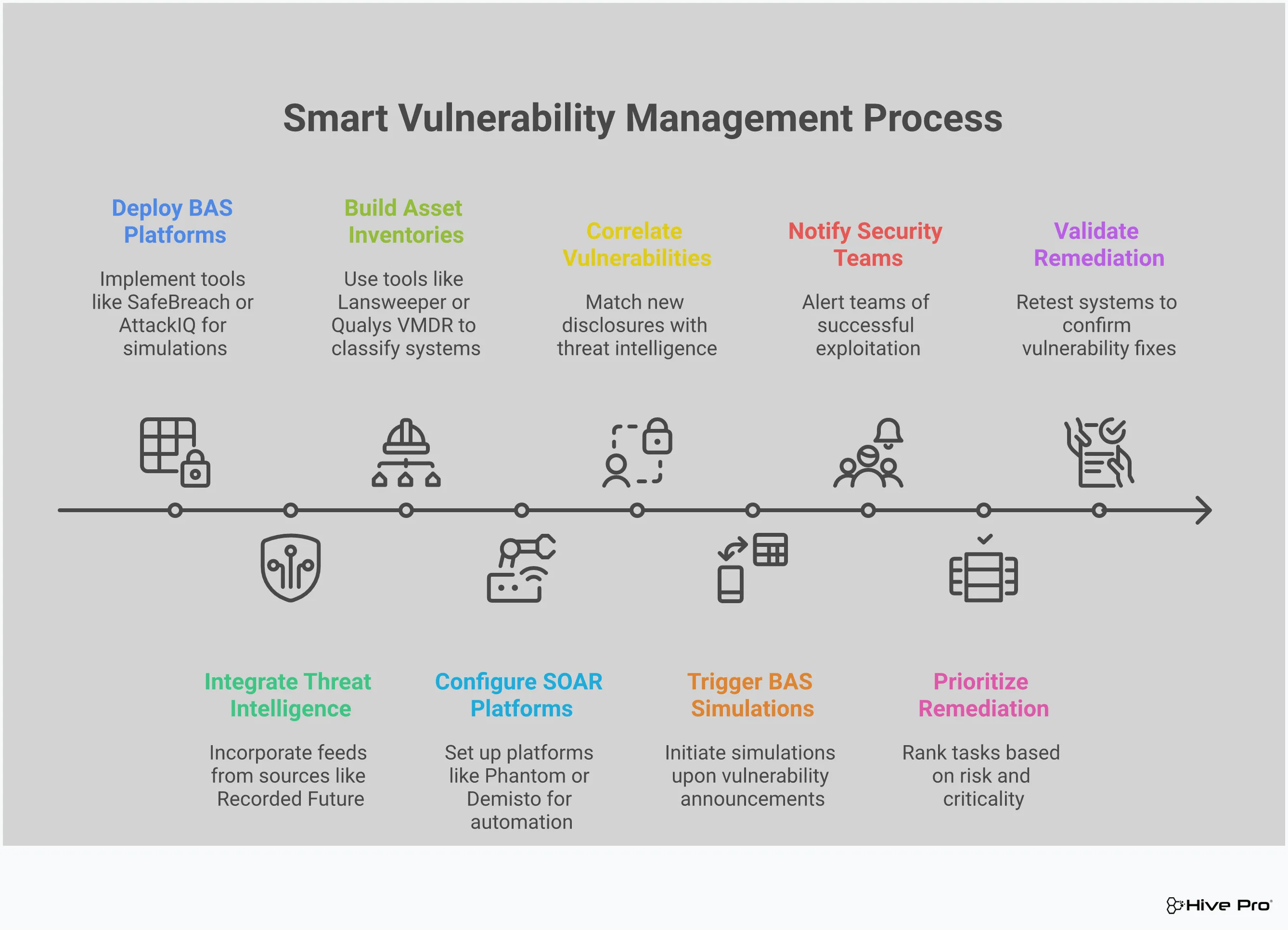
A CISO dashboard is more than just a collection of charts and graphs; it’s a strategic asset that can transform how your organization views and manages security. But simply having a dashboard isn’t enough. To make it truly effective, you need to treat it as a dynamic tool for communication, decision-making, and continuous improvement. It’s about turning raw data into a clear story that resonates with everyone from your security analysts to the board of directors. By focusing on alignment, optimization, and proving value, you can ensure your dashboard becomes an indispensable part of your security program.
This means moving beyond a “set it and forget it” mentality. The most powerful dashboards are living, breathing resources that evolve with your organization and the threat landscape. They provide the clarity needed to not only identify critical risks but also to analyze the effectiveness of your security controls and optimize your defenses. When your dashboard is woven into the fabric of executive decision-making, it stops being a simple reporting tool and becomes a cornerstone of your strategy, aligning cybersecurity with core business objectives and strengthening accountability across the entire organization.
A great dashboard starts with great conversations. Before you even think about which widgets to use, you need to understand what your stakeholders actually want to see. The metrics that matter to your board are very different from the granular data your SOC team needs. Your goal is to create a centralized view that gives leaders confidence in your security posture while providing your team with the actionable insights they need to do their jobs.
Start by defining clear requirements. Sit down with executives, department heads, and your security team to identify the key performance indicators (KPIs) that demonstrate business value. This alignment is crucial. When your dashboard clearly communicates how security efforts are protecting the business, it becomes much easier to secure the resources you need to strengthen defenses and meet compliance goals. Don’t build a dashboard in a silo; build it as a collaborative tool that answers the most important questions for each audience.
Think of your dashboard as a garden, not a statue. It requires regular attention to stay relevant and useful. The threat landscape is constantly changing, and your business priorities will shift over time. Your dashboard needs to reflect these changes. Schedule regular reviews—quarterly is a good starting point—to assess what’s working, what’s not, and what new information needs to be included.
A well-designed dashboard helps you move through a cycle of continuous improvement: you recognize critical risks and vulnerabilities, analyze the effectiveness of your security configurations, and optimize your defenses based on what you’ve learned. This process turns your dashboard from a passive reporting tool into an active defense mechanism. By integrating a comprehensive solution like the Uni5 Xposure Platform, you can feed your dashboard with the real-time, unified data needed to keep your view sharp and your strategy effective.
Ultimately, your CISO dashboard needs to answer one critical question: “Is our security investment paying off?” This is where you connect security metrics to business value. The dashboard is your primary tool for board presentations, providing a centralized guide to your organization’s cyber risk posture, threat landscape, and compliance status. It’s how you demonstrate the return on investment (ROI) for your security program.
To do this, focus on tracking the right cybersecurity KPIs. These are the specific metrics that measure the effectiveness of your defenses and your team’s preparedness. Instead of just showing the number of vulnerabilities, show the trend line decreasing over time. Highlight improvements in your Mean Time to Remediate (MTTR) for critical threats. By visualizing these outcomes, you can clearly demonstrate how your team’s efforts are reducing risk and protecting the bottom line.
How is a CISO dashboard different from the dashboards already in my other security tools? Think of it this way: your individual security tools each give you a detailed view of one part of the puzzle, like your network traffic or endpoint alerts. A CISO dashboard is what pulls all those puzzle pieces together to show you the complete picture. It integrates data from across your entire security stack to provide a single, unified view of your risk. This allows you to see how a vulnerability on a critical server connects to a threat that your intelligence feed is tracking, giving you the full story instead of just isolated facts.
My team is already overwhelmed with data. Won’t a dashboard just add to the noise? It’s a fair question, but a great dashboard is designed to do the exact opposite. Its primary job isn’t to show you more data, but to show you the right data by filtering out the noise. By correlating information about your assets with real-world threat intelligence, it highlights the handful of issues that pose a genuine, immediate threat to your business. It transforms that overwhelming flood of alerts into a clear, prioritized action plan for your team.
You mention prioritizing by risk, not just severity. What does that actually mean in practice? A severity score, like a CVSS rating, tells you how dangerous a vulnerability could be in a theoretical, worst-case scenario. A risk-based approach tells you how likely that scenario is to actually happen to you. It adds critical context, answering questions like, “Are attackers actively exploiting this vulnerability right now?” and “Does this vulnerability exist on a system that’s essential to our business?” This focus helps you address clear and present dangers first, rather than spending resources on problems that are only theoretical.
What’s the most effective way to use a dashboard to communicate with the board? The goal is to tell a clear story about progress and business impact. Instead of getting bogged down in the total number of vulnerabilities, use trend charts to show how your team is consistently reducing the number of critical risks over time. Metrics like Mean Time to Remediate (MTTR) are also incredibly powerful because they demonstrate your team’s efficiency and resilience in a way anyone can understand. These visuals prove the value of your security program and show that their investment is paying off.
I’m convinced I need one, but where do I even start? The best place to start is with people, not platforms. Before you look at any technology, have conversations with your key stakeholders, from the executive team down to your security analysts. Your goal is to understand what questions they need answered to feel confident about the organization’s security posture. Defining these requirements first ensures that you build or buy a dashboard that solves real business problems and provides genuine value from day one.