What Makes a Vulnerability Management Dashboard Effective?

Let's be direct: a high CVSS score doesn't mean a vulnerability is a top priority for your organization. Attackers don't care about theoretical scores; they care about clear, exploitable pathways to your critical assets. If your vulnerability management dashboard is only showing you generic severity ratings, it's not giving you the full picture. You're missing the crucial context of which vulnerabilities are actively being used in attacks right now and whether your existing security controls would stop them. By enriching your dashboard with threat intelligence and using Breach and Attack Simulation (BAS) to validate your exposures, you can finally start prioritizing threats based on actual, measurable risk to your business, not just a number.
Key Takeaways
- Go beyond simple patching: A modern dashboard transforms vulnerability management from a reactive checklist into a proactive strategy, giving you a single view of your security posture to help you anticipate and defend against likely attack paths.
- Focus on what attackers exploit: Don't get lost in a sea of high CVSS scores; use your dashboard to filter for vulnerabilities with known exploits and active threats, directing your team's limited resources to the issues that present a clear and immediate danger.
- Streamline your entire workflow: An effective dashboard is a command center, not just a reporting tool. Integrate it with your security stack to automate ticket creation, track remediation progress, and provide clear reports that keep every team aligned and accountable.
What is a Vulnerability Management Dashboard?
Think of a vulnerability management dashboard as the command center for your entire security operation. Instead of sifting through endless spreadsheets and disconnected alerts, you get a single, unified view of your organization's security health. This centralized hub is designed to pull in data from across your IT environment, giving you a real-time snapshot of every potential weakness. It’s the tool that helps you move from constantly putting out fires to strategically strengthening your defenses before an attack can even happen.
Defining Its Core Purpose
At its heart, a vulnerability management dashboard is a real-time interface that helps your security team see and manage security weaknesses. Its main job is to streamline the entire vulnerability management lifecycle, from detection and analysis to prioritization and remediation. Instead of operating in silos, your team gets a consolidated view of every potential threat across your IT infrastructure. This clarity allows you to stop guessing and start making informed decisions based on a complete picture of your security posture, all from one place.
How It Fits into Your Security Operations
A good dashboard does more than just list vulnerabilities; it translates raw data into clear, actionable insights for your security operations. It helps you answer the critical question: "What do we fix first?" By using metrics like risk scores, vulnerability aging, and asset criticality, the dashboard helps you prioritize threats that pose the most significant danger. This means your team can focus its limited time and resources on the issues that truly matter, rather than getting lost in a sea of low-risk alerts. It’s about working smarter, not just harder, to improve your overall security posture.
Shifting from Reactive Fixes to Proactive Defense
The ultimate goal of a modern vulnerability management dashboard is to shift your team from a reactive to a proactive security stance. Instead of just patching vulnerabilities as they appear, you can start to understand your attack surface and anticipate future threats. The dashboard helps you focus on the weaknesses that are actively being targeted or are most likely to be exploited by attackers. This strategic approach, a core part of a threat exposure management platform, allows you to get ahead of attackers by hardening the targets they are most likely to aim for. It transforms vulnerability management from a simple checklist of fixes into a forward-looking defense strategy.
What Makes a Dashboard Truly Effective?
A great dashboard does more than just display data; it tells a story about your security posture. It should cut through the noise of endless vulnerability alerts and give you a clear, actionable path forward. The most effective dashboards are built on a foundation of several key capabilities that work together. They transform raw data into strategic intelligence, helping you see your environment through an attacker's eyes and focus your team's efforts where they will have the greatest impact. Let's look at the core components that separate a truly useful dashboard from a simple data dump.
Scoring Risk and Classifying Threats
Your dashboard needs to move beyond basic CVSS scores. While these scores are a starting point, they don't tell the whole story about the risk to your organization. An effective dashboard enriches this data, helping you prioritize threats based on factors like exploitability, asset criticality, and active threats in the wild. It should clearly classify which vulnerabilities are not just theoretical but are actively being used in attacks. This allows your team to stop chasing every single alert and instead concentrate on the critical few that pose a genuine, immediate danger to your business operations, ensuring your resources are spent wisely.
Mapping Vulnerabilities to Your Assets
You can't secure what you don't know you have. That's why complete asset visibility is non-negotiable. A powerful dashboard provides a comprehensive view of your entire digital footprint, from on-premise servers to cloud instances and employee laptops. It maps every discovered vulnerability directly to the specific asset it affects. This level of attack surface management eliminates dangerous blind spots and ensures no system is left unmonitored. By understanding the full context of where a vulnerability lives, you can better assess its potential impact and make more informed decisions about how and when to address it.
Integrating Real-Time Threat Intelligence
A vulnerability's risk level isn't static; it changes with the threat landscape. A dashboard that integrates real-time threat intelligence gives you the context needed to understand which vulnerabilities are being actively targeted by attackers right now. This information, often curated by expert research teams like HiveForce Labs, is crucial for staying ahead of emerging threats. Instead of relying on outdated risk scores, you can see which CVEs are part of a new ransomware campaign or are being exploited by a known threat actor. This dynamic insight allows you to adjust your priorities on the fly and respond to the most pressing dangers first.
Tracking Remediation and Managing Workflows
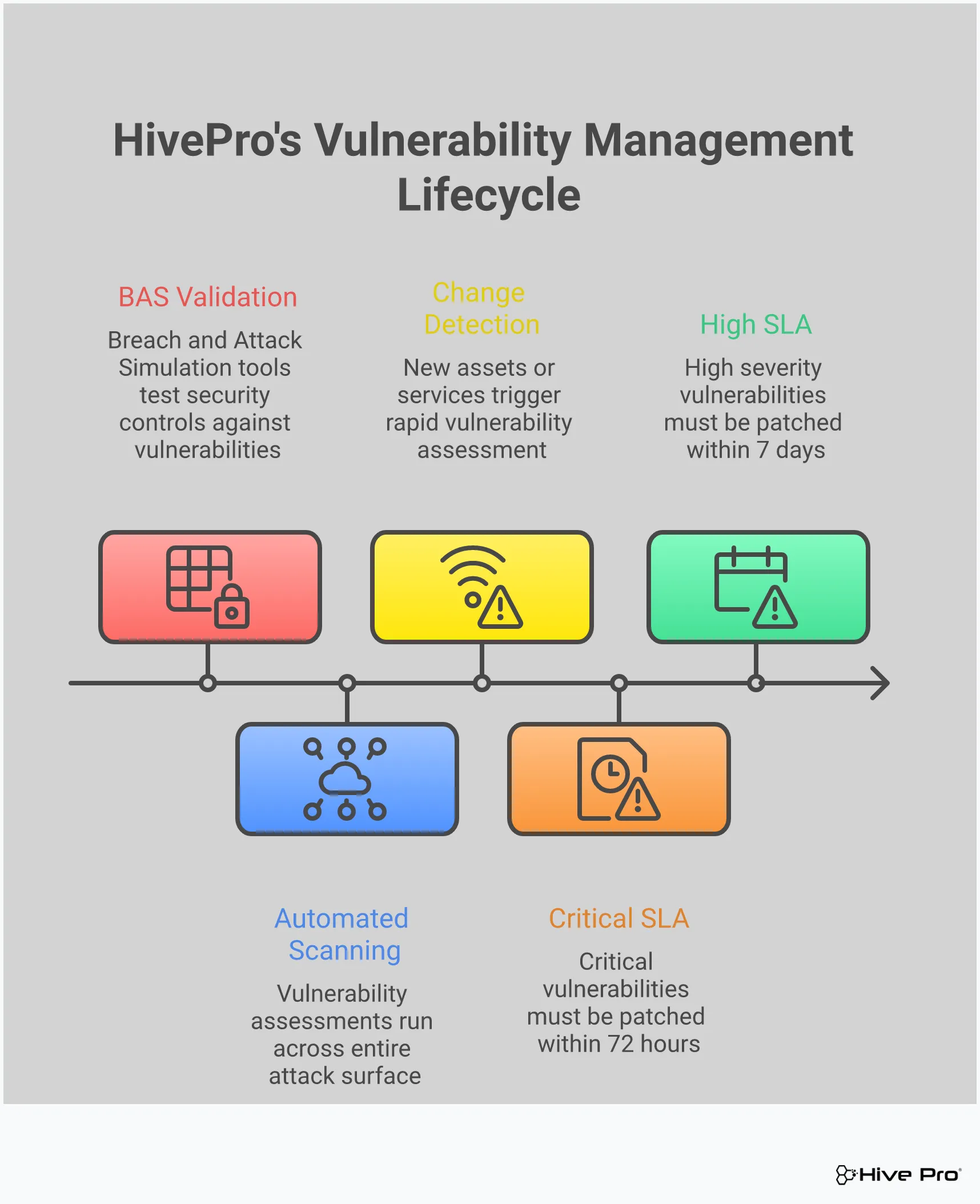
Identifying vulnerabilities is only the first step. An effective dashboard must also function as a command center for the entire remediation lifecycle. It should provide clear visibility into your team's patching progress, track how long vulnerabilities remain open, and help manage remediation workflows from assignment to closure. This creates accountability and helps you measure the effectiveness of your security program over time. When you can easily see which teams are meeting their SLAs and where bottlenecks are forming, you can address process issues and ensure that critical fixes are being deployed efficiently, shrinking your window of exposure.
Connecting Breach and Attack Simulation (BAS)
How do you know if a critical vulnerability is truly exploitable in your unique environment? This is where connecting your dashboard to Breach and Attack Simulation (BAS) tools becomes a game-changer. BAS technology safely simulates real-world attack paths to test if your existing security controls would actually stop an exploit. By performing adversarial exposure validation, you can confirm which vulnerabilities pose a practical threat versus a theoretical one. This allows you to filter out the noise from vulnerabilities that are mitigated by other controls, letting your team focus its limited time and resources on the exposures that represent a clear and present danger.
Which Metrics Actually Matter?
A great dashboard cuts through the noise. With thousands of potential vulnerabilities across your network, it’s easy to get lost in a sea of data. The key isn't to track every single metric available, but to focus on the ones that give you a clear, actionable picture of your risk. Think of it as the difference between having a map and having a GPS that tells you exactly where to turn next. The right metrics guide your remediation efforts, prove the value of your security program to leadership, and ultimately, help you stay ahead of threats. They transform your dashboard from a passive reporting tool into an active command center for your security operations.
This focus is what separates an effective vulnerability management program from one that's just spinning its wheels, patching low-risk issues while critical exposures remain open. When you're drowning in alerts, it's tempting to measure success by the number of tickets closed or patches deployed. But these are activity metrics, not impact metrics. An effective dashboard helps you shift your perspective to measure what really matters: actual risk reduction. It answers critical questions like, "Are we safer today than we were last month?" and "Are we focusing our efforts on the vulnerabilities most likely to be exploited?" Let's look at the specific metrics that truly move the needle and help you make confident, risk-informed decisions.
Tracking Vulnerability Discovery and Age
It’s not enough to know a vulnerability exists; you need to know how long it’s been sitting on your network. Old, unpatched vulnerabilities are like open invitations for attackers. An effective dashboard tracks the age of each finding from the moment of discovery, often grouping them by severity. This metric is crucial for holding your team accountable to service-level agreements (SLAs) and for systematically clearing out legacy risk. By monitoring vulnerability age, you can stop chasing the newest shiny threat for a moment and focus on closing the backdoors that have been unlocked for months, or even years.
Prioritizing Based on Real-World Risk
Let’s be honest, not all "critical" vulnerabilities are created equal. A high CVSS score doesn't automatically mean a finding is a top priority for your specific environment. This is where context is king. Your dashboard should provide a priority rating that goes beyond generic scores, incorporating real-world threat intelligence. Look for metrics that tell you if a vulnerability is actively being exploited in the wild, if an exploit is publicly available, or if it targets an asset critical to your business. This level of vulnerability and threat prioritization helps you focus your team’s limited time and resources on the threats that pose a genuine, immediate danger.
Measuring Remediation Performance
Finding vulnerabilities is only half the battle. Your dashboard is failing you if it doesn't also track how well you're fixing them. You need clear metrics on your team's remediation activities. This includes tracking which patches have been deployed, which assets have been updated, and the current status of every remediation ticket. This data allows you to measure your mean time to remediate (MTTR) and identify bottlenecks in your workflow. Are certain teams or departments lagging in their patching cadence? Is a specific type of vulnerability proving difficult to fix? These performance metrics are essential for refining your processes and demonstrating progress over time.
Visualizing Attack Surface Trends
You can't protect what you can't see. A powerful dashboard provides a clear, visual representation of your entire attack surface and how it's changing. Instead of just a list of vulnerabilities, you should see trends over time. Are new, high-risk assets appearing on the network? Is your overall risk score going up or down? The ability to visualize this data helps you quickly identify patterns and communicate the state of your security posture to stakeholders. Effective total attack surface management relies on seeing the big picture, not just individual data points, so you can make strategic decisions about where to invest your security efforts.
Focusing on Exploited Vulnerabilities
If you only have time to fix one thing, fix the vulnerability that attackers are using right now. Your dashboard’s most critical function is to shine a spotlight on these immediate threats. This requires a direct line to up-to-the-minute threat intelligence that identifies which vulnerabilities have known, active exploits. By filtering and prioritizing based on exploitability, you shift from a theoretical, compliance-based approach to a practical, threat-based one. This focus, informed by research from teams like HiveForce Labs, ensures your team is always working on the most dangerous issues first, dramatically reducing your chances of a breach.
How to Get the Most Out of Your Dashboard
An effective dashboard is more than just a pretty interface with charts and graphs. It’s a command center for your entire vulnerability management program. To truly make it work for you, you need to move beyond passive viewing and actively use its features to drive action. Turning raw data into a clear, proactive security strategy is the goal. Here’s how you can configure your dashboard to work smarter, not harder, for your team.
Prioritize Smarter with Threat Intelligence
Your team can’t fix every single vulnerability, and frankly, they shouldn’t have to. The key is focusing on what attackers are actually exploiting right now. This is where threat intelligence becomes your best friend. Instead of getting lost in a sea of CVEs and high CVSS scores, a great dashboard will integrate real-time data on active exploits, malware, and trending threats. This allows you to practice risk-based prioritization, directing your team’s limited time and resources to the vulnerabilities that pose a genuine, immediate threat to your organization. It’s the difference between chasing every potential problem and strategically neutralizing the most likely attacks.
Automate Workflows for Continuous Monitoring
If your team is manually running scans, creating tickets, and tracking remediation, you’re already behind. The sheer volume of new vulnerabilities makes manual management impossible. Your dashboard should be the hub for automating these critical workflows. You can set up continuous scanning schedules, automatically generate and assign remediation tickets in your ticketing system, and send alerts when patches are overdue. By automating these routine tasks, you establish a consistent, repeatable process for managing vulnerabilities. This not only reduces human error but also frees up your security analysts to focus on more complex threats and strategic initiatives instead of getting bogged down in administrative work.
Foster Team Collaboration with Clear Reporting
Vulnerability management is a team effort that often involves security, IT operations, and development teams. A dashboard that produces generic, one-size-fits-all reports isn’t helpful. To get everyone on the same page, you need clear, customizable reporting tailored to different audiences. Your IT team needs a straightforward list of assets to patch, while your CISO needs a high-level overview of risk posture and remediation trends. An effective dashboard provides role-based views and reports that give each team the specific information they need to act. This clarity fosters accountability and makes it easier to demonstrate progress and justify security investments to leadership.
Integrate with Your Existing Security Tools
Your vulnerability management dashboard shouldn't be an island. To get a complete picture of your risk, it needs to connect with the other tools in your security stack. Integrating with your SIEM, SOAR, CMDB, and ticketing systems creates a powerful, unified ecosystem. This allows you to enrich vulnerability data with context from other tools, streamline remediation workflows, and get a holistic view of your total attack surface. When your tools talk to each other, you eliminate data silos and manual correlation, enabling your team to respond to threats faster and more efficiently. It transforms your dashboard into a central, integrated part of your security operations.
Overcome Common Setup Challenges
Many vulnerability management programs stumble right out of the gate. Common hurdles include not having a complete inventory of all your assets, feeling overwhelmed by the initial scan results, and treating vulnerability management as a one-time project rather than a continuous cycle. A modern platform is designed to help you clear these hurdles from the start. It should provide comprehensive asset discovery to ensure you’re not missing anything and use risk-based prioritization to make the initial data manageable. By choosing a tool that supports continuous validation and a proactive approach, you can build a strong foundation for your program and avoid the common pitfalls that derail success.
Related Articles
- Vulnerability Management Best Practices: A Guide
- What Is Risk-Based Vulnerability Management?
- How Threat Intelligence Improves Vulnerability Management
- Breach and Attack Simulation (BAS): The Ultimate Guide
- Your Guide to Attack Surface Intelligence Exposures
Frequently Asked Questions
My team is already overwhelmed with alerts. Won't a dashboard just add more noise? That's a common concern, but a truly effective dashboard does the exact opposite. Its main job is to cut through the noise, not add to it. Instead of just listing every potential weakness, it uses threat intelligence and an understanding of your specific assets to filter and prioritize. It helps you see the handful of vulnerabilities that pose a genuine, immediate threat so your team can stop chasing down low-risk alerts and focus their energy where it will have the most impact.
How does a modern dashboard prioritize vulnerabilities differently than just using CVSS scores? While CVSS scores are a useful starting point, they only tell part of the story. They measure the theoretical severity of a vulnerability but lack real-world context. A modern dashboard adds crucial layers on top of that score. It considers if attackers are actively exploiting the vulnerability right now, if it affects a critical business asset, and if a public exploit is available. This transforms a generic, static number into a dynamic, risk-based priority that is tailored specifically to your organization.
What does it mean to connect Breach and Attack Simulation (BAS) to a vulnerability dashboard? Think of it as a reality check for your security posture. A vulnerability might exist on a server, but do your other security controls, like your firewall, prevent it from being exploited? Breach and Attack Simulation safely mimics real attacker techniques to test if a vulnerability is truly exploitable in your environment. Integrating this with your dashboard allows you to validate which theoretical risks pose a practical danger, helping you focus on fixing the weaknesses that represent a clear and present threat.
How can a dashboard help prove the value of our security program to leadership? A dashboard translates your team's technical work into clear, business-focused metrics that leadership can understand. Instead of just talking about patches deployed, you can show visual trends demonstrating a reduction in your overall attack surface, a lower average time to fix critical issues, and a decrease in high-risk vulnerabilities over time. This data-driven storytelling provides tangible proof that your security investments are actively reducing the organization's risk.
We have so many different security tools. How does a dashboard fit in without creating another data silo? A great dashboard shouldn't be another isolated tool; it should be the central hub that connects your existing security ecosystem. By integrating with your other systems, like your asset inventory (CMDB), security information and event management (SIEM), and ticketing platforms, it creates a single, unified view. This allows you to enrich vulnerability data with context from other tools and streamline your entire workflow from detection to remediation, making your whole security operation more efficient.







.svg)