Comprehensive Threat Exposure Management Platform
 Critical Threat Research : Middle-East at WAR: The Rapidly Escalating Iranian Cyber Threat Download the Report Critical Threat Research : Middle-East at WAR: The Rapidly Escalating Iranian Cyber Threat Download the Report
Your team knows the drill: a security alert goes out, and everyone scrambles to patch. But what happens in the critical window before a fix is available for a new Chrome zero-day vulnerability? Relying on a reactive cycle of patching leaves your organization dangerously exposed. Attackers thrive in this gap, exploiting the flaw before your defenses are even aware of it. A truly resilient security program is built for this reality. It requires moving beyond just patching and into a proactive stance. We’ll explore how to protect your systems when there’s no patch to deploy, focusing on validating your existing controls and using intelligence to prepare for the unknown.
When you hear about a “zero-day” vulnerability in Google Chrome, it sounds urgent—and it is. These are some of the most critical security flaws because they’re discovered by attackers before the developers who can fix them even know they exist. Understanding what these vulnerabilities are, why Chrome is such a popular target, and how these attacks play out is the first step in protecting your organization from them.
At its heart, a zero-day vulnerability is a software flaw that’s unknown to the vendor. The term “zero-day” refers to the fact that developers have exactly zero days to create a patch before attackers can start using it. The exploit—the malicious code written to take advantage of the flaw—is already in the wild, actively being used to attack systems. This isn’t a theoretical risk; it’s an active threat. By the time the vulnerability is discovered and announced, attackers may have already been using it for days, weeks, or even longer to compromise systems and steal data, all before a fix is available.
With billions of users worldwide, Google Chrome is a massive and attractive target for attackers. A single successful exploit can provide access to a vast number of potential victims. Zero-day vulnerabilities are especially prized because they are, by definition, unpatched, making them highly effective. Many recent Chrome zero-days have been “type confusion” flaws. In simple terms, this is when the browser gets mixed up about the type of data it’s processing. This confusion can be manipulated by an attacker to execute their own malicious code within the browser, effectively hijacking it to steal information or gain further access to the user’s system.
The attack lifecycle begins when a threat actor discovers a new vulnerability before Google’s security team does. They then write and deploy exploit code designed specifically to leverage this flaw. This code is often delivered through a compromised website or a malicious ad; a user simply visiting the wrong page can trigger the attack. If the exploit is successful, the attacker can run arbitrary code on your computer, crash your browser to create a diversion, or install malware. This initial foothold can then be used for data theft, ransomware deployment, or moving laterally across your network. This is why adversarial exposure validation is so important—it helps you test if your defenses can withstand these kinds of real-world attack techniques.
To understand the real-world risks of zero-day attacks, it helps to look at specific examples. Chrome is a complex piece of software, and its various components can become targets for attackers looking for a way in. By examining a few recent, high-impact vulnerabilities, you can see patterns in how these exploits work and why they pose such a significant threat to your organization’s security. These aren’t just theoretical problems; they are active threats that security teams have to contend with regularly. Understanding the mechanics behind these attacks is the first step toward building a more resilient defense strategy that goes beyond just waiting for the next patch.
The V8 engine is the powerful heart of Chrome, responsible for running the JavaScript that makes modern websites interactive. When a flaw appears here, it’s a serious problem. A critical vulnerability in the V8 engine can be actively exploited by attackers, turning a simple website visit into a major security incident. According to Singapore’s Cyber Security Agency, these flaws are particularly urgent because they pose a significant threat to users and require immediate patching. An attacker who successfully exploits a V8 vulnerability could potentially execute arbitrary code on a user’s machine, giving them a foothold inside your network.
Type confusion is a class of vulnerability where an attacker tricks a program into processing one type of data as if it were another. This can cause the application to behave unexpectedly, often leading to a crash that can be exploited for code execution. Google’s own Threat Analysis Group, which tracks sophisticated state-sponsored attacks, has identified type confusion vulnerabilities being actively used in the wild. This type of attack is subtle and effective, allowing a malicious website to potentially hijack a visitor’s browser just by being loaded. It’s a reminder that even the most routine web browsing can expose your systems to advanced threats.
The vulnerabilities we’ve discussed aren’t just a problem for Chrome users. Because browsers like Microsoft Edge, Brave, and Opera are built on the same open-source Chromium platform, a flaw in the core code can affect them all. This creates a massive attack surface for threat actors. A single vulnerability, like a type confusion flaw, can put millions of users at risk across multiple applications. This shared codebase underscores the importance of tracking threat advisories that cover the entire software ecosystem, not just a single product. When a patch is released for Chrome, your team needs to ensure all other Chromium-based browsers are updated as well.
When a zero-day vulnerability surfaces in a browser as widely used as Chrome, it’s not just a technical problem—it’s a direct threat to your organization’s security. These flaws create openings for attackers to bypass your defenses, often with minimal effort. Because there’s no patch available when the exploit first appears, traditional security tools might not even detect the malicious activity. The impact can range from a minor data leak to a full-blown network compromise, all originating from a single user visiting a compromised website. Understanding these specific risks is the first step toward building a more resilient defense strategy.
A compromised browser is like an open door to your most sensitive information. If your Chrome browser isn’t updated, just visiting a malicious website could allow attackers to steal data, install malware, or take complete control of a user’s system. This isn’t limited to personal browsing history or saved passwords. For an organization, this could mean attackers siphoning off customer data, intellectual property, or confidential financial records. The browser acts as the gateway to everything a user accesses, making it a prime target for credential theft and espionage. A successful attack can quickly escalate into a major data breach, leading to regulatory fines and a loss of customer trust.
Beyond stealing data, a zero-day exploit can give an attacker a foothold inside your network. For example, a recent critical flaw in Chrome’s V8 engine was a “type confusion vulnerability,” which essentially lets attackers trick the browser into executing malicious code. This can lead to a full system compromise, where the attacker gains control over the user’s machine. From there, they can move laterally across your network, disable security controls, and deploy ransomware or other malware. The browser becomes the initial point of entry for a much larger, more devastating attack, turning a simple web session into a significant security incident that can disrupt your entire operation.
Zero-day vulnerabilities are especially dangerous because, as Forbes notes, attackers are already using them to cause harm before a fix is available. The fact that a flaw is being exploited “in the wild” makes it an urgent threat that requires immediate attention. For your business, the consequences extend far beyond the technical realm. You’re facing potential financial losses from operational downtime, the high cost of incident response, and serious damage to your brand’s reputation. This is why a reactive approach is no longer enough. You need a way to get ahead of these threats by focusing on your most critical exposures and validating your defenses against real-world attack scenarios.
Knowing the risks is one thing, but actively defending against them is what matters. While you can’t predict a zero-day, you can build a strong defensive posture that minimizes your exposure and reduces the potential impact. It all comes down to a combination of timely updates, smart configurations, and good old-fashioned security hygiene. Here are the essential steps you and your team should take to protect your browsers.
This might sound basic, but it’s the most critical step. When Google releases a security patch for a zero-day, it’s a race against attackers. The sooner you update, the smaller your window of vulnerability. Make it a habit to check for updates daily. More importantly, you must restart your browser for the update to take effect. Simply closing the tab isn’t enough. A full restart applies the patch and closes the door on that specific exploit. Leaving your browser open for days on end means you’re leaving that door wide open, even if you’ve already downloaded the fix. Updating your Chrome browser should be a non-negotiable, immediate action for everyone on your team.
Don’t rely on manual updates alone. You can ensure you get critical security fixes as soon as they’re available by enabling automatic updates in Chrome. This removes the human element of forgetting to check. Beyond that, take advantage of Chrome’s built-in security features. Turn on Enhanced Protection mode. This feature provides more proactive and predictive security by checking for dangerous sites, downloads, and extensions in real-time. It sends data to Google Safe Browsing to help detect new threats, giving you an early warning system against phishing sites and malicious files before they can do any damage. It’s a simple toggle that adds a significant layer of defense.
Your browser is just one entry point. A comprehensive defense strategy requires layers of security that protect your entire system. At a minimum, ensure all endpoints are equipped with up-to-date antivirus and anti-malware software. These tools can often detect and block malicious payloads that might be delivered through a browser exploit. For a more robust approach, your security stack should include endpoint detection and response (EDR) solutions. It’s also crucial to continuously test your existing security controls to ensure they are configured correctly and can actually stop an attack. Validating your defenses with adversarial exposure validation helps you find and fix gaps before an attacker exploits them.
Technology can only do so much; user behavior is a huge piece of the puzzle. Cultivate a culture of caution within your organization. This means being skeptical of unsolicited links and email attachments, even if they appear to come from a trusted source. Avoid visiting untrustworthy websites or downloading software from unofficial repositories. If a website seems slow or is behaving strangely, it’s best to close the tab immediately. Attackers often use compromised websites to deliver zero-day exploits. Just visiting a malicious page with an unpatched browser can be enough for an attacker to gain control of your system, so smart browsing is a critical line of defense.
Even with the best defenses, a zero-day exploit can sometimes slip through. The key is to act quickly and decisively. Knowing the signs of a compromise and having a clear plan can make all the difference in containing the damage. If you think your browser or system has been compromised, don’t panic. Follow these steps to assess the situation, respond effectively, and strengthen your defenses for the future. This is where your incident response plan gets put to the test, moving from theory to critical, real-time action.
The first indication of a compromise might be subtle. Pay close attention to your browser’s behavior. Is Chrome suddenly crashing or freezing? Are you experiencing unusual slowness or seeing unexpected pop-ups and redirects? These can all be red flags. Attackers often use zero-day vulnerabilities to cause this kind of instability. These flaws are considered among the most dangerous because attackers are already using them to cause harm before a patch is available. Don’t dismiss performance issues as a simple glitch; they could be the first and only warning sign that an attacker has gained a foothold in your system.
If you suspect a compromise, your first move is simple but critical. As security experts advise, the single most important thing you can do is to update Chrome right away. A pending update often contains the patch for the very zero-day being exploited. After initiating the update, restart the browser to ensure the patch is applied. Depending on your organization’s policy, you might also need to disconnect the affected machine from the network to prevent lateral movement. Alert your security team immediately, providing as much detail as possible about the suspicious activity you observed. A swift, coordinated response is essential.
Once you’ve updated Chrome and isolated the machine, it’s time to investigate the extent of the compromise. A successful exploit could allow an attacker to run malicious code on your computer. Start by running a full system scan with your endpoint security software to detect and remove any malware. Carefully review your browser extensions and remove any you don’t recognize or that seem suspicious. Check for any recently installed applications or changes to system settings that you didn’t authorize. The goal is to find and eliminate any persistence mechanisms the attacker may have established, ensuring your system is truly clean before reconnecting it to the network.
After addressing the immediate threat, focus on long-term prevention. First, ensure automatic updates are enabled in Chrome across all company devices. This guarantees that critical security fixes are applied as quickly as possible. Reinforce safe browsing habits with your team, reminding them to be cautious with suspicious links and avoid untrustworthy websites. To get ahead of future threats, consider a more proactive approach. Instead of just patching, you can use Adversarial Exposure Validation to test if your security controls can actually stop these types of exploits. This helps you move from a reactive cycle to a confident, proactive security posture.
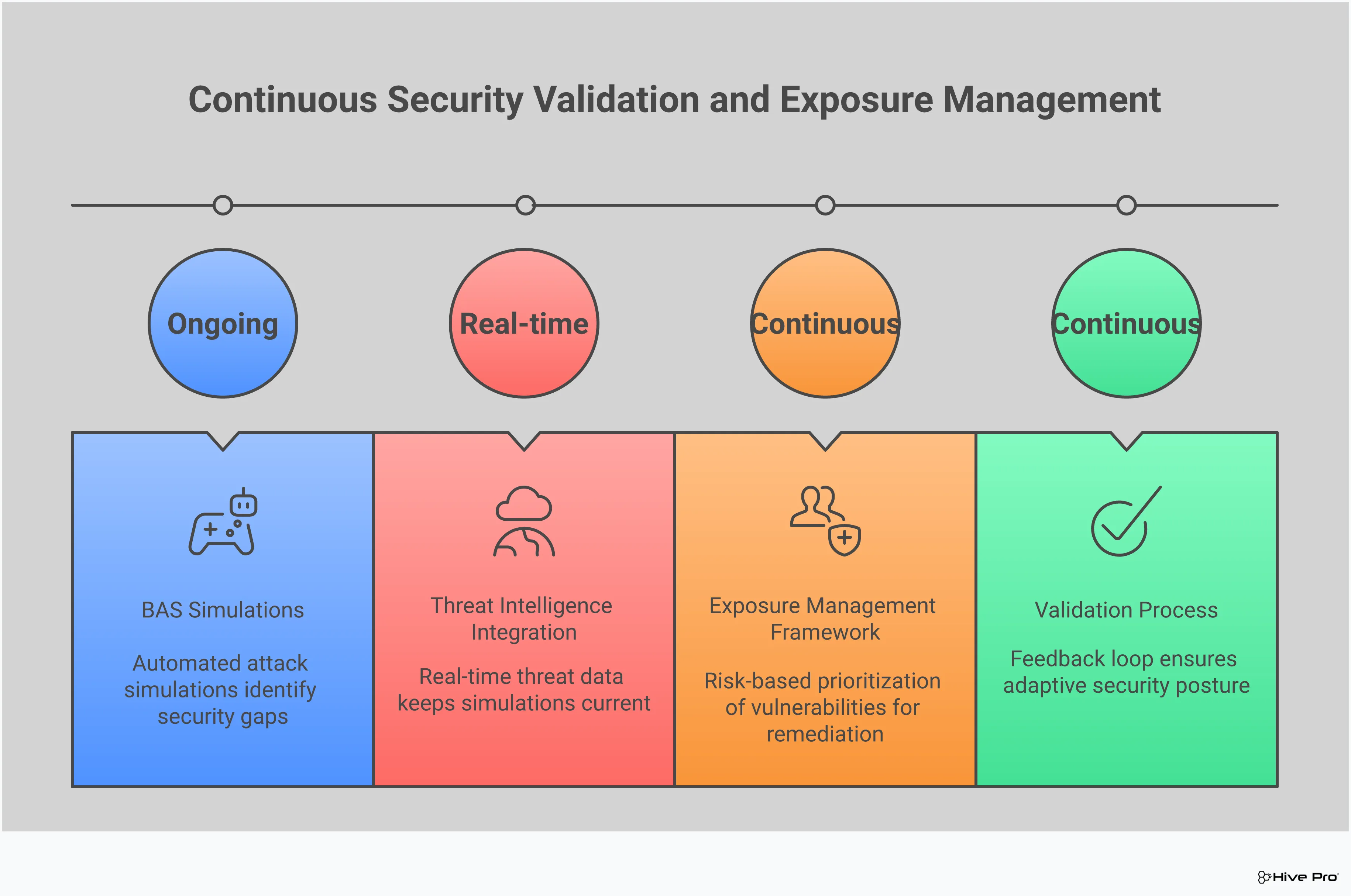
Keeping your browser updated is a critical first step, but a truly resilient security strategy doesn’t stop there. To get ahead of threats like zero-day exploits, you need to shift from a reactive stance to a proactive one. This means building a program that continuously assesses your environment, prioritizes real-world threats, and validates your defenses before an attack happens. By combining a comprehensive view of your exposure with targeted threat intelligence and simulated attacks, you can build a security posture that’s prepared for the unknown.
Zero-day vulnerabilities are dangerous precisely because they’re exploited before a patch is available. Simply waiting for vendors to release updates leaves you in a vulnerable position. This is why leading security teams are adopting a Continuous Threat Exposure Management (CTEM) program. Instead of scrambling to patch after an announcement, a CTEM approach gives you a constant, unified view of all your assets and their potential exposures. This allows you to understand your full attack surface and identify weaknesses that could be exploited. By seeing your environment through the eyes of an attacker, you can implement compensating controls and reduce your overall risk, making your organization a much harder target even before a specific patch is developed.
Your security team faces a constant stream of vulnerability alerts, and it’s impossible to fix everything at once. The key is to focus on what matters most. This is where threat intelligence becomes your best friend. When security researchers report that a flaw is being actively used by attackers “in the wild,” it’s no longer a theoretical problem—it’s an urgent threat. A strong vulnerability and threat prioritization strategy uses real-time intelligence to pinpoint which vulnerabilities pose the greatest and most immediate risk to your systems. This data-driven approach helps you cut through the noise and direct your team’s valuable time and resources to fixing the issues that attackers are targeting right now.
You have firewalls, endpoint protection, and other security controls in place, but how do you know they’ll actually work against a novel zero-day attack? Instead of waiting for a real breach to find out, you can use Breach and Attack Simulation (BAS) to test your defenses. These tools safely simulate the tactics and techniques used by attackers, including those seen in zero-day exploits. By running these simulations, you can perform adversarial exposure validation to identify gaps in your security stack, like misconfigurations or policy weaknesses. This proactive testing ensures your defenses are not only deployed but are also effective, giving you confidence that you can withstand an attack.
What’s the real difference between a vulnerability and an exploit? Think of it this way: a vulnerability is the weakness itself, like an unlocked window on the ground floor of a house. It’s a flaw in the software’s code that creates a potential security problem. An exploit, on the other hand, is the specific tool or technique an attacker creates to take advantage of that unlocked window to get inside. The vulnerability is the opportunity; the exploit is the action.
Why is restarting Chrome so important after an update? Can’t I just keep working? Simply downloading an update doesn’t fully protect you. The new, patched code isn’t actually applied until you completely restart the browser. Until you do, you’re still running the old, vulnerable version. Attackers count on people leaving their browsers open for days at a time, which gives them a much larger window to use an exploit even after a fix has been released. A quick restart is the final step that actually closes the security gap.
If a vulnerability is in Chrome, are other browsers like Microsoft Edge or Opera safe? Not necessarily. Many popular browsers, including Microsoft Edge, Brave, and Opera, are built on the same open-source foundation as Chrome, called Chromium. When a vulnerability is discovered in the core Chromium code, it often affects every browser built on that platform. This is why it’s so important to keep all your browsers updated, not just the one you use most often. An issue for Chrome is often an issue for the entire ecosystem.
My team is great at patching. Why do we need to do more than that? Patching is absolutely essential, but it’s a reactive measure. A zero-day attack, by definition, happens before a patch is available. Relying only on patching means you’re always one step behind the attackers. A proactive approach involves using tools like Breach and Attack Simulation to test if your existing security controls can stop the techniques attackers use, even when the specific vulnerability is unknown. It’s about making sure your defenses work, not just hoping they do.
How can threat intelligence help with a zero-day if there’s no patch yet? Threat intelligence does more than just tell you when to patch. It gives you insight into how attackers are operating right now. Even without a patch, intelligence can tell you what kind of flaw attackers are using (like a type confusion) and the methods they use to deliver the exploit. You can use this information to validate your defenses. For example, you can check if your security tools are configured to block the specific types of malicious scripts or network activity associated with the attack, providing a layer of protection while you wait for the official fix.