Comprehensive Threat Exposure Management Platform
 Critical Threat Research : Middle-East at WAR: The Rapidly Escalating Iranian Cyber Threat Download the Report Critical Threat Research : Middle-East at WAR: The Rapidly Escalating Iranian Cyber Threat Download the Report
With billions of users, Google Chrome is more than just a browser; it’s a fundamental part of your organization’s attack surface. It’s installed on nearly every endpoint, from the C-suite to the intern pool. This ubiquity is precisely what makes a Chrome zero-day vulnerability so uniquely dangerous. A single flaw doesn’t just compromise a browser; it provides a potential gateway into your entire network. Attackers know this, which is why they invest so much effort in finding these hidden entry points. We’ll explore the real-world impact of these exploits and provide actionable steps to protect your data, systems, and operations.
Before we get into the nitty-gritty of protection, let’s make sure we’re all on the same page about what we’re up against. A Chrome zero-day isn’t just another bug; it’s a specific and highly dangerous type of security flaw. Understanding its nature is the first step in building a solid defense. It’s about knowing your enemy. When a zero-day hits, it means attackers have found a secret way into one of the world’s most popular pieces of software, and they’re using it before anyone has a chance to build a defense. This puts immense pressure on security teams to react quickly and effectively.
At its core, a zero-day vulnerability is a software flaw that is unknown to the developers who created it. The term “zero-day” comes from the fact that once an attacker discovers this flaw, the developers have exactly zero days to fix it before it can be exploited. It’s a race against time. An attacker can use this exploit to create serious problems long before the software vendor or security teams even realize something is wrong. This element of surprise is what makes these vulnerabilities so potent and why a proactive approach to vulnerability and threat prioritization is so critical for any organization.
The reason attackers focus so much energy on Chrome is simple: scale. With billions of users worldwide, Google Chrome is a massive and incredibly attractive target. A single successful exploit can potentially impact a huge number of individuals and organizations. What’s more, Chrome’s foundation, the Chromium open-source project, is also the backbone for many other popular browsers like Microsoft Edge, Brave, and Opera. This means a flaw discovered in Chrome can often have a ripple effect, creating a vulnerability across a significant portion of your organization’s total attack surface, even if not everyone is using Chrome as their primary browser.
A Chrome zero-day isn’t just a technical glitch; it’s a direct threat to your organization’s security posture. When attackers exploit these hidden flaws, the impact can ripple out from a single browser to your entire network. Understanding the specific ways these vulnerabilities can affect you is the first step in building a stronger defense. It’s about moving beyond the abstract concept of a “vulnerability” and seeing the tangible risks to your data, systems, and overall operations.
Because zero-day exploits are, by definition, unknown to defenders, they strike without warning. This element of surprise gives attackers a clear advantage, allowing them to access and steal sensitive information before you even know you’re vulnerable. For an organization, this could mean the theft of customer data, proprietary company secrets, or employee credentials. Once attackers have this information, they can use it for financial fraud, corporate espionage, or sell it on the dark web. The lack of early detection makes these attacks particularly damaging, as the breach can go unnoticed for a significant period, compounding the potential harm to your business and your reputation.
Think of a zero-day vulnerability as an unlocked door. Once an attacker slips through, they can bring in all sorts of unwelcome guests. A successful exploit often serves as the initial entry point for deploying other malicious software. Attackers can install ransomware that encrypts your critical files and holds them hostage, or spyware that silently monitors user activity to steal passwords and other sensitive data. This turns a single browser issue into a full-blown security incident. The initial Chrome zero-day vulnerability becomes the launchpad for a much larger, more destructive campaign that can disrupt operations and lead to significant financial and data loss.
An attack rarely stops at the first compromised machine. After gaining control of a user’s computer through a browser exploit, attackers often use that foothold to move laterally across your network. From that initial endpoint, they can probe for other weaknesses, escalate their privileges, and spread to other computers, servers, and critical systems. This is how a single user clicking a malicious link can lead to a network-wide ransomware infection or a major data breach. If you suspect an exploit, the first step is to isolate the affected systems to contain the threat. Understanding your total attack surface is critical to preventing this kind of rapid, widespread damage.
The real threat of a Chrome zero-day isn’t just that it’s a flaw; it’s the element of surprise. Because Chrome is the world’s most popular browser, a single undiscovered vulnerability gives attackers a massive potential target pool. When they find a way to exploit it before Google’s security team does, they have a golden opportunity to act.
This isn’t about a vulnerability that might be exploited one day. It’s about one that is actively being used in the wild to compromise systems, steal data, and deploy malware. For security teams, this means you’re already behind. You’re not preparing for a potential threat; you’re responding to an active one that you didn’t even know existed. This reactive posture is exactly what attackers count on. The goal is to move from reacting to these threats to proactively validating your defenses against them. A strong threat exposure management program helps you build that resilience.
A zero-day vulnerability is, by definition, an unknown. It’s a security flaw in software that developers are unaware of, meaning they have had “zero days” to create a patch. Attackers who discover these flaws can create and use an exploit before anyone realizes there’s a problem. This gives them a critical window of opportunity to launch attacks without being detected by traditional signature-based security tools.
This lack of warning is what makes a zero-day exploit so effective. There’s no patch to apply and no specific threat signature to look for. Security teams are left trying to detect unusual behavior or post-breach activity, which is far more difficult than blocking a known threat.
Many of Chrome’s most critical zero-days are found deep within its core components. The V8 engine, which is responsible for executing JavaScript, is a frequent target. Since nearly every modern website uses JavaScript, a flaw here can give an attacker control over what happens in your browser. Similarly, ANGLE (Almost Native Graphics Layer Engine) handles graphics rendering, and vulnerabilities in this component can be exploited to crash the browser or execute malicious code.
When a flaw like this is actively exploited, it’s a race against time. Google rushes to develop and deploy a patch, while security teams must ensure it’s applied immediately. This is where effective vulnerability and threat prioritization becomes essential, helping you focus on the fixes that protect you from active attacks.
Attackers often rely on specific types of memory-related errors to exploit these flaws. One common method is “type confusion.” This happens when a program gets confused about the type of data it’s handling, allowing an attacker to trick it into executing malicious code. Imagine giving the browser a file you claim is an image, but it’s actually a script—if the browser doesn’t validate it correctly, it might run the script.
Another classic technique is the “buffer overflow.” This occurs when an attacker sends more data to a program than it’s built to handle, causing the excess data to spill over into adjacent memory areas. This can overwrite critical instructions and allow the attacker to run their own code. These types of exploits are subtle but powerful, turning a simple browser flaw into a major security breach.
To understand the real-world impact of these vulnerabilities, you don’t have to look far. These aren’t just theoretical threats; they are actively discovered and exploited in the wild, often forcing Google to rush out emergency patches. The sheer frequency of these discoveries is what keeps security teams on their toes. In a single year, it’s not uncommon for Google to patch half a dozen or more actively exploited zero-days, each one representing a critical window of exposure for millions of users and organizations.
These exploits often target the core components of the browser—the very engines that make the modern web work. Attackers find clever ways to manipulate how Chrome processes code or renders graphics, turning a seemingly harmless website visit into a full-blown security incident. Keeping up with the latest discoveries is a constant battle, which is why staying informed through up-to-date threat advisories is so critical. Let’s look at a few specific types of flaws that have appeared recently.
One of the key components attackers have targeted is ANGLE (Almost Native Graphics Layer Engine), which Chrome uses to translate graphics commands. A buffer overflow vulnerability in this component is a classic but effective attack. Think of it like pouring too much water into a glass—the overflow has to go somewhere. In a cyber attack, threat actors send more data than a program’s buffer can handle, causing the excess data to overwrite adjacent memory. This can corrupt data, crash the system, or, in a worst-case scenario, allow the attacker to execute malicious code on your machine. It’s a direct route for taking control.
The V8 engine is the heart of Chrome, responsible for executing JavaScript—the code that makes web pages interactive. Because it’s so fundamental, it’s a prime target for attackers. We’ve seen a steady stream of zero-days targeting V8, with some years seeing more than a handful of actively exploited flaws. A common exploit is the “type confusion” bug. This happens when a program is tricked into processing one type of object as another, creating a logical error that attackers can manipulate to bypass security measures. When multiple, similar vulnerabilities are found in the same component in a short period, it highlights the need for robust vulnerability prioritization to focus on the most critical risks.
A vulnerability in Chrome is rarely just a problem for Chrome users. That’s because Chrome is built on the open-source Chromium project, which serves as the foundation for many other popular browsers, including Microsoft Edge, Brave, and Opera. When a zero-day is discovered in Chromium’s code, it creates a ripple effect, leaving users of multiple browsers exposed until each developer can issue their own patch. This shared codebase means that your organization’s attack surface is likely much larger than you think. An unpatched Edge browser on one employee’s machine could be just as vulnerable to a “Chrome” zero-day as the rest of your team.
By their very nature, zero-day attacks are designed to be stealthy. Since there’s no patch and security tools don’t have a signature for them, they can be incredibly difficult to detect. However, that doesn’t mean they’re completely invisible. Sometimes, an exploit leaves subtle clues that something is wrong. If you know what to look for, you can spot the breadcrumbs an attacker might leave behind. Paying attention to your system’s behavior is the first step in identifying a potential compromise before it escalates. These signs often appear as performance issues or strange behavior that you might otherwise dismiss as a random glitch.
One of the first places you might notice a problem is in Chrome itself. If an attacker is exploiting a vulnerability, it can destabilize the browser. You should watch for your browser crashing, freezing, or running unusually slow. These aren’t just minor annoyances; they can be symptoms of malicious code interfering with normal processes. An exploit might be consuming excessive memory or CPU resources as it works, causing the performance to degrade noticeably. If Chrome suddenly starts acting up without a clear reason—not just after a recent update or with too many tabs open—it’s worth investigating. This change in behavior is a red flag that something is happening under the hood.
We’ve all been trained to ignore random pop-ups, but in the context of a zero-day, they can be a serious warning sign. If you suddenly see unexpected pop-ups or your browser redirects you to websites you didn’t intend to visit, take it seriously. This could indicate that an attacker has successfully executed malicious code. For example, a common flaw is “type confusion,” where the browser gets confused about data, allowing attackers to run their own harmful code. This code could be designed to display ads, redirect you to phishing sites, or download more malware onto your system. Keeping up with the latest threat advisories can help you recognize the tactics attackers are currently using.
For security teams, a key indicator of compromise often lies in network traffic. If you suspect a system has been exploited, monitor its network activity closely. Look for connections to unfamiliar or suspicious IP addresses, unexpected data transfers, or communication over non-standard ports. Internally, you can review browser logs and system event logs for unusual GPU or sandbox-related errors, which might point to an exploit attempting to break out of the browser’s security container. If you do suspect a compromise, your first move should be to isolate the affected systems from the network to prevent the threat from spreading while you investigate further with a platform that gives you a unified view of cyber risks.
While the threat of a zero-day exploit can feel overwhelming, you aren’t powerless. Attackers might be sophisticated, but they often rely on outdated software or simple user mistakes to succeed. By taking a few deliberate, proactive steps, you can significantly harden your defenses and make your browser a much less attractive target. Think of it as digital self-defense—these foundational practices are your first and best line of protection against opportunistic attacks.
The single most important thing you can do is keep your browser updated. It sounds simple, but it’s incredibly effective. Google’s security team works around the clock to find and fix vulnerabilities. When they release an update, it often contains patches for critical security flaws, including zero-days that attackers are already actively exploiting. By delaying updates, you’re leaving a known entry point open. Set your browser to update automatically, and when you see that “Update” button, don’t ignore it. Acting quickly closes the window of opportunity for attackers and ensures you have the latest security protections from Google as soon as they are available.
Beyond just updating, Chrome has powerful built-in tools you can use to your advantage. The most important one is “Enhanced Protection” mode. Tucked away in your security settings, this feature provides a much more proactive defense than the standard settings. It performs real-time checks against Google’s Safe Browsing lists to warn you about dangerous websites, malicious downloads, and sketchy extensions before they can do any harm. Turning it on is one of the easiest security wins you can get. Just go to Settings > Privacy and security > Security and select Enhanced Protection. It’s a simple click that adds a significant layer of real-time defense to your daily browsing.
Technology can only do so much; your habits are the final piece of the puzzle. Cultivating a healthy sense of skepticism is key to staying safe online. Be wary of unsolicited links and email attachments, even if they appear to come from someone you trust—their account could be compromised. Always download software from official websites or app stores, as third-party sites often bundle legitimate apps with malware. Most importantly, trust your instincts. If a website is behaving strangely, bombarding you with pop-ups, or trying to force a download, close the tab immediately. These small, mindful actions create a powerful human firewall against common attack vectors.
That sinking feeling when you suspect a breach is something no security pro wants. But panic doesn’t solve problems—a clear plan does. If you think a Chrome zero-day or another exploit has hit one of your systems, taking immediate and deliberate action is critical. The goal is to contain the threat, assess the damage, and get back to a secure state as quickly as possible. Here are the essential steps to follow.
The first rule of incident response is to stop the bleeding. If you suspect a system has been exploited, your immediate priority is to isolate affected systems from the network. Unplugging the ethernet cable or disabling the Wi-Fi adapter can prevent the exploit from spreading laterally across your network and compromising other assets. This containment step is crucial. While you’re doing that, start documenting everything: the time you noticed the issue, the specific symptoms, and any actions you’ve taken. This initial log will be invaluable for the forensic investigation that follows. Having a clear incident response plan ready to go makes these first moments much less chaotic.
Once the system is isolated, it’s time to figure out what you’re dealing with. Start by running a full system scan with your endpoint security software to detect and remove any malware. Make sure your security tools are fully up to date with the latest threat definitions to maximize their effectiveness against new exploits. Beyond a standard scan, look for other signs of compromise. Check for newly created user accounts, unfamiliar processes running in the task manager, or strange network connections trying to establish themselves. A comprehensive threat exposure management platform can help you continuously monitor for such anomalies and identify vulnerabilities before they’re exploited.
Knowing who to tell and when is just as important as the technical response. Your internal incident response plan should clearly outline the reporting chain—who on the security team, in management, and on the legal team needs to be notified immediately. For external reporting, your obligations depend on the type of data involved and your jurisdiction. Regulations like GDPR and CCPA have strict timelines for notifying affected individuals and authorities. Reporting the incident to relevant authorities, such as the FBI’s Internet Crime Complaint Center (IC3) or your local law enforcement, can also help. Having a pre-vetted communications plan ensures you meet your legal obligations without causing unnecessary panic.
You can’t predict the future, but with the right intelligence, you can make a highly educated guess. When it comes to zero-days, waiting for a patch to be released means you’re already behind. A proactive security posture relies on understanding the threat landscape before an exploit becomes widespread news. This is where a strong threat intelligence program becomes your most valuable asset.
Think of it as the difference between having a weather forecast and just looking out the window. Threat intelligence gives you the data you need to see the storm coming. It provides context about emerging threats, attacker behaviors, and which vulnerabilities are being actively exploited in the wild. By integrating this intelligence into your security operations, you can move from a reactive cycle of patching and praying to a strategic approach focused on your most critical risks. This is a core principle of a Continuous Threat Exposure Management (CTEM) strategy, helping you make smarter, faster decisions to protect your organization.
The first 24 hours of a zero-day exploit are critical. The key to getting ahead is identifying the attack before it has a name or a CVE number. High-fidelity threat intelligence, like the research from our HiveForce Labs, provides real-time alerts on suspicious activity. This includes monitoring for unusual network traffic, strange software behavior, and other indicators of compromise (IOCs) that often serve as the earliest breadcrumbs of a new attack. Instead of waiting for official vendor announcements, your team gets an early warning, allowing you to start investigating and containing a potential threat before it spreads across your network.
Not all vulnerabilities are created equal. A theoretical flaw is interesting, but a flaw being actively used by threat actors to target your industry is an emergency. Threat intelligence tells you what attackers are actually doing. It answers critical questions: Who is behind the attack? What techniques are they using? Are they targeting specific sectors or technologies? This context is crucial for effective threat modeling and risk assessment. By understanding the adversary’s playbook, you can better anticipate their moves and align your defensive strategy to counter their specific tactics, rather than trying to defend against everything at once.
When a Chrome zero-day hits, the natural impulse is to panic and try to patch everything immediately. But in a large organization, that’s rarely feasible. Threat intelligence helps you cut through the noise and focus your efforts where they’ll have the most impact. By combining vulnerability data with real-world exploit intelligence, you can accurately prioritize your remediation tasks. This allows you to answer questions like, “Which of our assets are both vulnerable and exposed to this active threat?” This targeted approach, a cornerstone of vulnerability and threat prioritization, ensures your team spends its limited time and resources on the fixes that matter most, effectively shrinking your attack surface against immediate dangers.
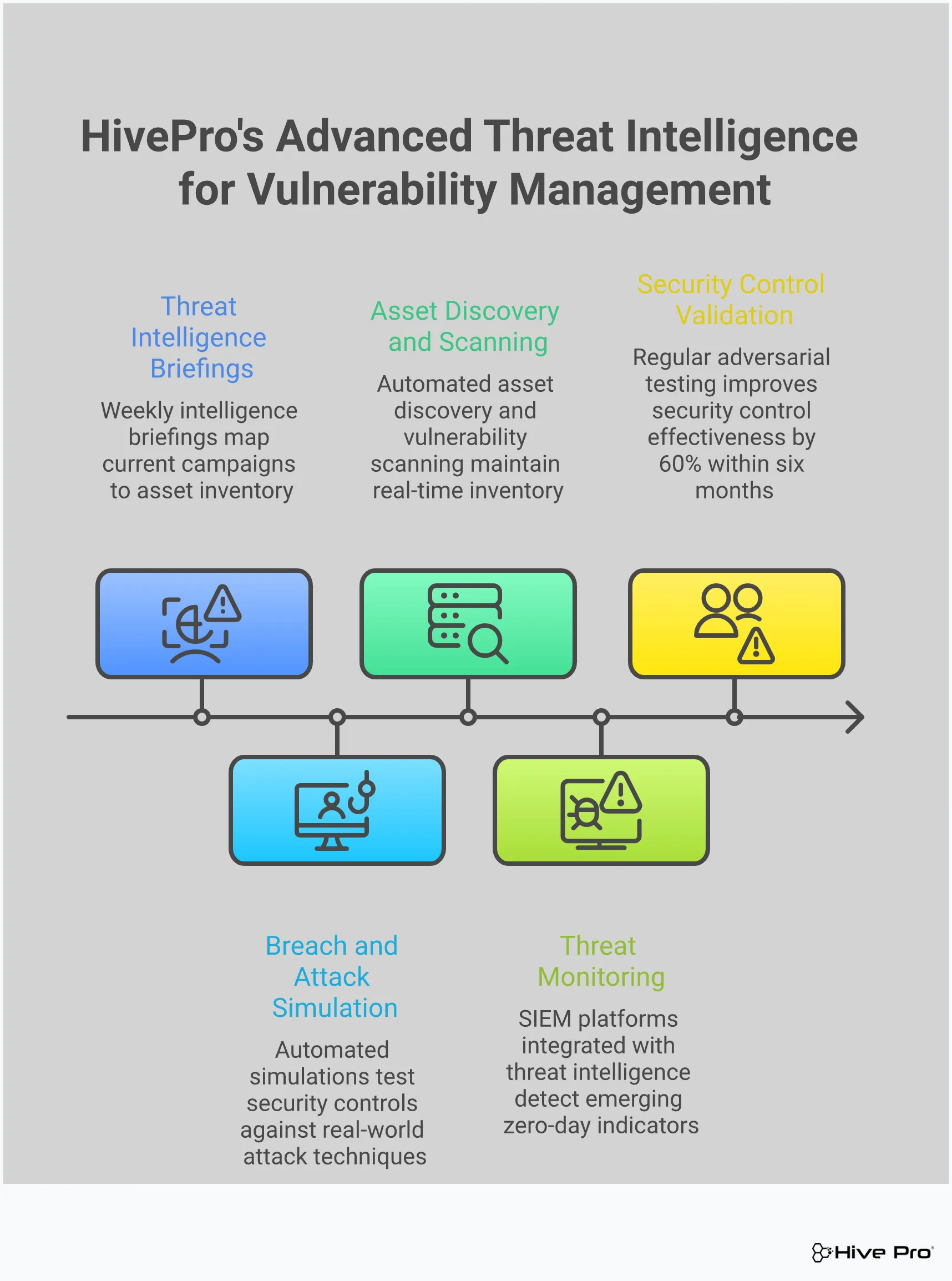
Knowing about a threat like a Chrome zero-day is one thing; knowing if your defenses can actually stop it is another. This is where Breach and Attack Simulation (BAS) comes in. Think of it as a sparring partner for your security stack. BAS tools allow you to safely and automatically simulate the real-world attack techniques that adversaries use, all within your own environment. Instead of just hoping your firewalls, EDR, and other security controls will work when a real attack happens, you can test them continuously to see how they perform under pressure.
This proactive approach helps you see exactly how your security posture holds up against specific threats, including the exploits used in zero-day attacks. By running these simulations, you can validate that your security tools are not only deployed but also configured correctly to detect and block malicious activity. It’s a critical part of modern adversarial exposure validation that moves you beyond theoretical risk. You get concrete evidence of what’s working and, more importantly, what isn’t, long before an actual attacker finds out for you. This allows your team to fix gaps based on proven risk rather than guesswork, ensuring your security investments are delivering real value.
The primary goal of BAS is to find your security gaps before an attacker does. These platforms run thousands of attack simulations that mimic the tactics, techniques, and procedures (TTPs) of known threat actors. The simulations test every layer of your defense, from perimeter security to endpoint protection, to see what gets through. This isn’t just about finding a missing patch; it’s about identifying misconfigurations, policy gaps, or security tools that aren’t performing as expected. By seeing which simulated attacks succeed, you get a clear, evidence-based roadmap for vulnerability and threat prioritization, allowing you to focus your team’s time and resources on fixing the weaknesses that pose the greatest actual risk to your organization.
Your IT environment is always changing—new assets come online, configurations are updated, and users are added. At the same time, attackers are constantly developing new methods. That’s why security testing can’t be a one-time event. BAS fits perfectly into a Continuous Threat Exposure Management (CTEM) program by making security validation an ongoing, automated process. Instead of an annual penetration test that provides a point-in-time snapshot, BAS gives you a continuous view of your security effectiveness. This ensures that your defenses remain strong against emerging threats and that changes in your environment haven’t accidentally created new vulnerabilities. With a platform like Uni5 Xposure, this continuous validation becomes a core part of your security operations.
The traditional response to a new zero-day announcement is often a frantic scramble to patch systems and hunt for indicators of compromise. This reactive cycle is stressful and leaves you constantly on the back foot. BAS helps you break that cycle. By regularly testing your defenses against a wide range of attack techniques, you build a baseline of your security resilience. When a new threat emerges, you’re not starting from zero. You already have a high degree of confidence in your security controls because you’ve seen them work. This allows you to respond to new threats strategically and calmly, focusing on targeted actions instead of widespread panic. It’s a fundamental shift from reactive firefighting to proactive, confident protection.
What’s the real difference between a zero-day and any other vulnerability? Think of it this way: a regular vulnerability is like knowing there’s a broken lock on a door. A patch is the replacement lock, and you have time to install it. A zero-day is when a burglar discovers that broken lock and is already inside your house before you even knew it was faulty. The key difference is the element of surprise—attackers are actively using the flaw before a fix is available, leaving security teams with “zero days” to prepare.
If a zero-day is unknown, how can Breach and Attack Simulation (BAS) possibly test for it? This is a great question because it gets to the heart of how BAS works. A BAS platform doesn’t need to know the specific, brand-new exploit. Instead, it simulates the behaviors and techniques an attacker would use after they get in. It tests whether your security controls can detect things like lateral movement, privilege escalation, or data exfiltration. So, while it can’t simulate the unknown key, it can test whether all the alarms go off once someone unlocks the door and starts walking around your network.
My company uses Microsoft Edge, not Chrome. Are we in the clear? Unfortunately, no. Many popular browsers, including Microsoft Edge, Brave, and Opera, are built on the same open-source foundation as Chrome, called the Chromium project. This means a vulnerability discovered deep within Chromium’s code often affects all of these browsers simultaneously. An attack targeting a core flaw could compromise an Edge user just as easily as a Chrome user, making it critical to understand your entire browser attack surface, not just the one with the Google logo.
Why can’t my standard security tools, like firewalls or antivirus, just block these attacks? Most traditional security tools work like a bouncer with a list of known troublemakers. They rely on “signatures”—unique fingerprints of known malware and attacks. A zero-day exploit is, by definition, a new threat that isn’t on the list yet. Because it has no known signature, it can often walk right past these defenses undetected. This is why a layered defense that includes behavioral analysis and threat intelligence is so important.
Besides updating Chrome, what is the most practical step my team can take to reduce our risk? The most impactful step is to start integrating real-world threat intelligence into your vulnerability management program. Instead of just patching every vulnerability you find, intelligence helps you focus on the ones that are actively being exploited by attackers in the wild. This lets you prioritize your team’s time and resources on fixing the flaws that pose an immediate danger, moving you from a reactive “patch everything” cycle to a proactive strategy focused on your true exposure.